


Most virtual parties die within the first five minutes: a grid of pixelated faces, audio that chops up when two people laugh, and a long pause that makes everyone stare at their own camera tile instead of the room.
This guide fixes that with real usage notes and “My Test” callouts, so picking an app for hosting virtual parties takes minutes—not a whole night of trial and error.
Judging Criteria
- Interactivity: Games, gifts, watch-sync, or tools that push people to react out loud.
- Audio/Visual Stability: Handles shouting, music, and fast talk without turning everyone into robots.
- The “Vibe” Factor: The UI should energize the room, not read like a meeting agenda.
Quick Comparison: Top Party Apps
| App Name | Fun Factor | Stability | Best For | Rating |
|---|---|---|---|---|
| BIGO LIVE | High | High | Wild interaction & PK battles | ★★★★★ |
| Discord | High | Medium | Gamers & communities | ★★★★☆ |
| Rave | Medium | Medium | Watch parties | ★★★★☆ |
| Zoom | Low | High | Large formal gatherings | ★★★☆☆ |
| Google Meet | Low | High | Quick, easy access | ★★★☆☆ |
| Teleparty | Medium | High | Netflix syncing | ★★★☆☆ |
| Skype | Low | Medium | Old-school reliability | ★★☆☆☆ |
1. BIGO LIVE
Best for Chaotic energy, real-time reactions, PK battles, and multi-guest rooms.
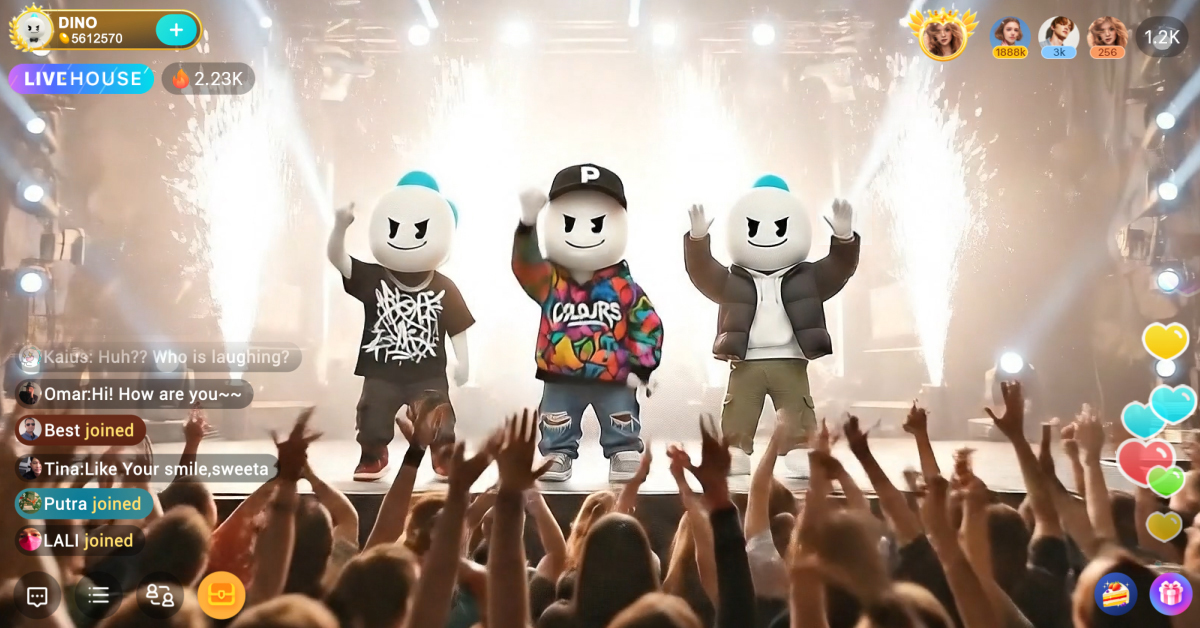
If other apps land like a quiet dinner, BIGO LIVE lands like a packed club: your eyes catch gift animations bursting across the screen, chat flying fast, and face stickers tracking expressions in real time.
The room pushes people to participate instead of sitting back, and PK battles turn casual hanging out into a loud, competitive cheer-fest.
My Test
- I pushed the Multi-Guest Room to the limit by filling all 12 seats with friends—most apps start choking when the grid is full, but the room stayed watchable even while everyone spammed gesture filters and talked over each other.
- Hidden trick: when the room energy dips, tap “Challenge the Top” in gifting to see what it takes to grab Top Fan—calling that out often triggers instant shout-outs and gets the chat moving again.
2. Discord
Best for Gaming crews, friend groups with channels, and always-on community hangouts.
Discord runs like a huge house with endless rooms: one channel has Lo‑Fi beats, another has a friend streaming gameplay, and voice chat stays the main event.
Dark mode stays easy on the eyes at 1 a.m., and noise suppression can cut out background mess so voices land cleaner.
My Test
- I enabled the hidden “Party Mode” easter egg: typing messages triggers confetti and screen shake, which is corny in a quiet chat—but hilarious when the room is already hyped.
- Small downside: noise suppression can get too aggressive and clip quiet laughs, so turning it off sometimes makes the hangout sound more human.
3. Rave
Best for Watch parties where everybody stays synced without “3, 2, 1, play.”
Rave keeps the video in lockstep, so pauses and rewinds don’t split the room into different timestamps.
The dark interface keeps the focus on the movie while chat sits ready for quick reactions and jokes.
My Test
- I tested the audio delay slider when a friend’s connection caused lip-sync drift; adjusting timing per person can save a night that would otherwise turn into “wait, what did they say?”
- Small downside: on phone screens, the chat bubble can be stubborn to minimize and may cover subtitles unless you tap just right.
4. Zoom
Best for Big, structured gatherings where everyone already knows the controls.
Zoom’s superpower is familiarity: send a link, and even the least techy friend can usually jump in without a long setup.
For karaoke nights, settings like “Original Sound” can keep singing from getting flattened into mush.
My Test
- I cranked “Touch Up My Appearance” to the max after a bad sleep, and it smoothed skin so hard it looked waxy; fast hand waves can reveal the filter trying to keep up with your face.
- Small downside: time caps on some free plans can kill momentum, and the countdown makes the room tense when the party is finally rolling.
5. Google Meet
Best for Quick “no download” hangouts that work straight from a browser.
Google Meet is the low-friction option: it loads fast, the UI stays clean, and it’s easier to get a mixed-device group into one room.
Low-light tweaks can brighten a dim room enough that you don’t look like a shadow in the corner of the screen.
My Test
- I pushed the free version until it surfaced the 60-minute warning; the pop-up can land abruptly and snap people out of the vibe.
- Quick trick: prep a fresh link before the session ends and paste it into chat early so the group can hop over fast with minimal confusion.
6. Teleparty (formerly Netflix Party)
Best for Desktop Netflix nights with synced playback and a persistent chat sidebar.
Teleparty keeps a disciplined room: synced streaming plus chat that stays visible so reactions don’t cover faces on screen.
It’s desktop-first, so it works best when everyone’s already on a laptop and ready to type while they watch.
My Test
- Fullscreen can be annoying: when the video goes fullscreen, chat can disappear, forcing a “mostly fullscreen” window size if you want both the movie and the jokes at once.
7. Skype
Best for Classic calls, “show-and-tell” hangouts, and big meme drops.
Skype is heavier than newer options, but it still shines when you want to share photos and files that show up big and clear.
And yes—its incoming ringtone can still trigger instant nostalgia for anyone who grew up on early internet calls.
My Test
- I used Split View on desktop, which separates contacts and video into two windows—great on dual monitors when you want the party on one screen and chat/files on the other.
- Small downside: file transfers can crawl compared to Discord, and a meme that arrives late can miss the moment.
The Final Verdict: Which Room Should You Join?
The “perfect” app depends on tonight’s plan: for a quiet movie marathon where nobody has to talk much, Rave keeps playback synced; for a quick birthday call with family, Google Meet stays easy to join.
If the goal is to recreate the loud, reactive, in-the-moment energy of a real party, BIGO LIVE stands out because the tools (multi-guest rooms up to 12 seats, gifts, and PK battles) push people to act, not just watch.
Ready to host? Hit the download button, open a multi-guest room, and give the group something to react to right away.
Download BIGO LIVEQuick Picker
Choose your vibe, group size, and main activity. The pick updates instantly.
Best for: Wild interaction, loud energy, and on-screen reactions.
- Great when you want the room to get noisy fast.
- Built around participation (gifts, chat momentum, and PK battles).
- Multi-guest rooms scale well for group hangouts.
FAQ
How many people can join a BIGO LIVE multi-guest room?
A host can set the room to include up to 12 participants at one time, including the host.
What’s the easiest option for friends who won’t install new apps?
Google Meet is usually the simplest “click a link and join” choice when your group is allergic to downloads.
What’s best if the whole party is centered on a movie?
Rave is built for synced watch parties, so the room stays on the same timestamp without manual countdowns.
