


Searching for a decent Houseparty replacement often ends in frustration. You download an app, invite three friends, and spend the next twenty minutes fighting with sign-up links, muffled audio, or interfaces that require an engineering degree to operate. You want that open door feeling, where you just drop in and see faces, but you keep hitting locked doors.
We fixed that. This list cuts through the noise with 7 proven alternatives, rigorously tested for speed, fun, and stability.
Our Core Criteria
These are the three things you usually care about when hunting for apps like Houseparty: getting into a hangout fast, having something to do beyond staring at each other, and staying smooth when more friends jump in.
- Drop-in Spontaneity: Can you join a room in one tap, or do you need to schedule a meeting?
- Interactive Layer: Does it offer games, gifts, or filters to break the awkward silence?
- Stream Stability: Does the video freeze when a fourth person joins?
Quick Comparison: Top 7 Group Video Apps
| App Name | Drop-in Ease | Fun Factor: games and gifts | Stability | Best For |
|---|---|---|---|---|
| BIGO LIVE | Global community and spontaneity | |||
| Discord | Gamers and organized communities | |||
| Bunch | Multiplayer gaming | |||
| Yubo | Gen Z socializing | |||
| FaceTime | iOS loyalists | |||
| Close friends and family | ||||
| Zoom | Large groups and stability |
Quick Pick
1BIGO LIVE
The closest vibe to a global house party.
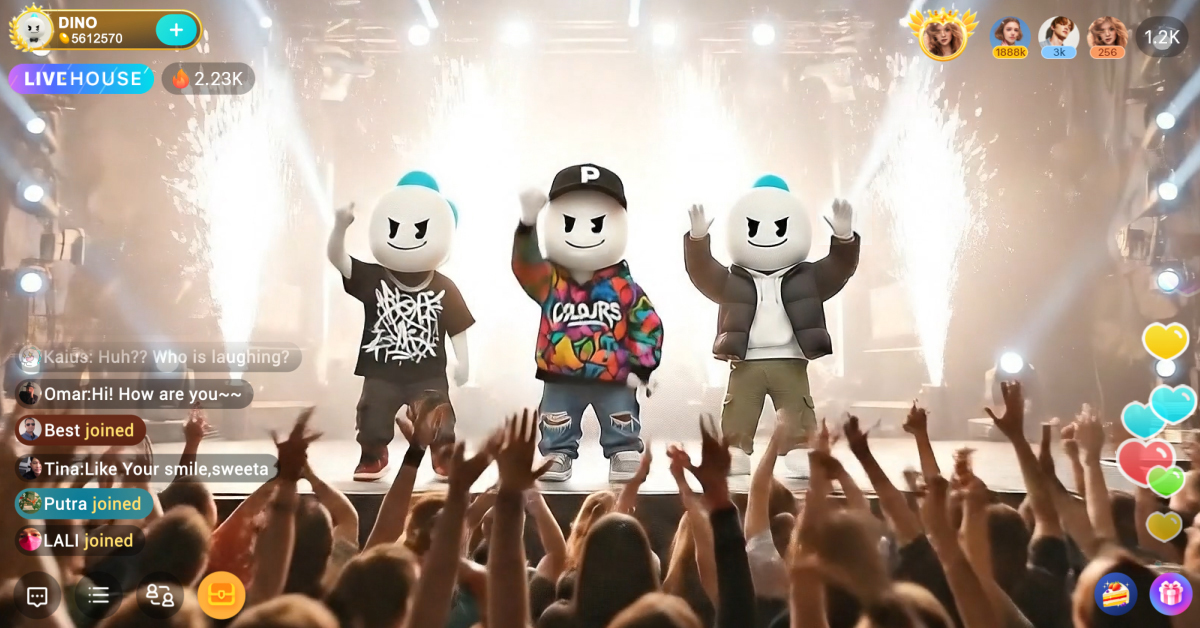
When you open BIGO LIVE, your screen immediately fills with movement. Unlike sterile messenger apps, you see a mosaic of live rooms. Entering a Multi-guest room hits you with immediate energy: the sound of background music, the visual pop of animated gifts exploding on screen, and the ability to grab a seat instantly.
The interface places the video feed front and center, with chat overlaying the bottom in semi-transparent white text. You do not just call friends here; you make new ones. The Bar feature allows you to swipe through random group chats, replicating that feeling of walking into different rooms at a real party to see who is hanging out.
While the video quality is crisp, new users often miss the Audio Mode switch.
- The Trick: If you are in a 12-seat room and your connection stutters, tap the three dots in the bottom right and switch to Data Saving Mode. It kills the video feed but keeps the audio crystal clear.
- The Flaw: The notifications for popular rooms can get aggressive. You need to manually go into Settings, then Notifications, then toggle off New Recommendations if you want your phone to stop buzzing every hour.
Ready to Experience the Best Alternative to Houseparty?
Join millions of users worldwide in spontaneous video hangouts
 Download BIGO LIVE Now
 2Discord
The low-latency lounge for hobbyists.
Discord feels like a dark, comfortable basement den. The interface is text-heavy with a dark gray palette that rests easy on the eyes. Joining a Voice Channel provides a satisfying bloop sound, instantly connecting your mic. You do not ring people; you just hop into a channel, and your avatar lights up green when you speak.
The noise suppression is elite. You can hear the distinct click of a mechanical keyboard or the crinkle of a snack bag only if the user turns off Krisp suppression. It lacks the visual party overlay of Houseparty, but the audio latency is practically non-existent.
- The Trick: If one friend is shouting and another is whispering, right-click their user icon on desktop, or long-press the icon on mobile. You can adjust User Volume individually. This is a lifesaver for group chats with uneven mic quality.
- The Flaw: On mobile, finding the Share Screen button during a video call requires two extra taps compared to the desktop version. It is buried in the bottom swipe-up menu, which feels clunky when you want to show something quickly.
3Bunch
The Metaverse party for mobile gamers.
Bunch tries to force interaction through activity. You do not just stare at each other; you launch games like Draw Party or Mars Dash. The visual experience allows you to see your friends' faces in small bubbles at the top of the screen while the rest of the display renders the game graphics.
You hear the game sound effects mixed with your friends' voices. It mimics the sensation of sitting on a couch passing a controller back and forth. The colors are neon-bright, and the transitions between the lobby and games involve swooshing sound effects that keep the energy high.
- The Trick: You can actually play games that are not built into Bunch, like Minecraft or Roblox, while keeping the Bunch voice and video overlay active.
- The Flaw: This app eats battery life like a hungry teenager. During a 20-minute session of Flappy Lives, my iPhone 15 Pro got noticeably hot to the touch near the camera bump. Do not use this without a charger nearby.
4Yubo
The swipe-based social circle.
Yubo mimics the swiping mechanic of dating apps but repurposes it for friendship. The interface uses rounded corners and a bright yellow theme. When you join a Live, you see the main streamer and several guest boxes. The interaction relies heavily on add requests.
You will see a lot of hand gestures and hear music playing directly from users' phones. It captures the chaotic, unstructured energy of a high school cafeteria.
- The Trick: Use the Boost feature sparingly. It pushes your room to the top of the feed, but it costs in-app currency. Save it for Friday nights when traffic is high.
- The Flaw: The age verification process is strict. If the lighting in your verification selfie does not match your profile exactly, the AI locks you out for 24 hours. I got locked out just for wearing a hat during the check.
5FaceTime
The frictionless choice for Apple ecosystems.
FaceTime offers a sterile, polished glass experience. The video quality usually beats third-party apps, showing the pores on a face or the texture of a shirt clearly. With SharePlay, the audio of a movie or song syncs perfectly across devices.
The Spatial Audio feature is subtle but effective. If a friend's tile is on the right side of your screen, their voice sounds like it is coming from the right. It lacks games, but it feels like you are in the same room.
- The Trick: If the floating heads make you dizzy, go to Settings, then FaceTime, and turn off Speaking. This stops the tiles from resizing and moving around every time someone makes a noise.
- The Flaw: The Create Link feature for Android and Windows users is hit-or-miss. I sent a link to a friend on a Pixel 8; they got in, but their audio had a rigorous 2-second delay that made conversation painful.
6WhatsApp
The utility knife of global calling.
WhatsApp is not flashy. It is green, white, and functional. The connection tone is a distinct, rhythmic trill. When video connects, the interface is bare-bones: just the video feed and a red hang up button.
It handles poor network conditions better than almost anything else. If the signal drops, the video pixelates into a blocky mess, but the audio usually holds on, sounding slightly robotic but intelligible. It is the app you use when you just need to see your friends without bells and whistles.
- The Trick: Long-press your own video preview and you can hide it. This is great if you catch yourself staring at your own face instead of your friends.
- The Flaw: The group video limit is 32 people, but once you pass 8 people, the phone screen becomes a mess of tiny, unrecognizable squares. You can hardly see facial expressions at that point.
7Zoom
The reliable boardroom that works for beers.
Zoom smells like an office, but it works. The Gallery View is the main draw here. Seeing a grid of 20 friends equally spaced provides a sense of order. The audio is heavily processed to prioritize speech, cutting out background dogs barking or traffic noise.
It does not have the spontaneous knock to enter vibe, but the Breakout Rooms can simulate moving between different conversations at a massive party.
- The Trick: Enable Original Sound for Musicians in the audio settings. If you try to play guitar or laugh loudly with standard settings, Zoom treats it as background noise and mutes you.
- The Flaw: The 40-minute limit on the free tier for groups is a vibe killer. Nothing ruins a hangout faster than the Meeting ends in 10 minutes countdown timer flashing in red at the top of the screen.
Which App Should You Download Today?
If you want the full Houseparty experience—spontaneous video, interactive features, and the ability to meet new people beyond your existing contacts—BIGO LIVE delivers on all fronts. The multi-guest rooms recreate that drop-in party atmosphere, while the gift system and global community add layers that pure video calling apps cannot match.
For gamers who already live in server communities, Discord remains unbeatable. If you need something that works on spotty Wi-Fi for international family calls, WhatsApp is your safety net. But for recapturing that lightning-in-a-bottle feeling of randomly joining a room full of strangers who become friends? BIGO LIVE is the real successor to Houseparty's legacy.
The best part? You do not have to take our word for it. Download a few of these apps, test them with your crew, and see which one sticks. Just remember: the app is only as good as the people you bring into it.
Start Your First Live Hangout in 60 Seconds
No scheduling. No awkward invites. Just open the app and jump in.
Get BIGO LIVE Free 