


Welcome to the ultimate guide on Bigo Live's virtual gifting feature! This tutorial is designed to walk you through the simple yet exciting process of sending virtual gifts to your favorite broadcasters.
By the end of this article, you will understand how to purchase and send gifts, how they impact the streamer's ranking, and how you can become a top supporter in their community.
Whether you're new to Bigo Live or looking to make a bigger impact, this guide will show you how to share your appreciation and enhance your viewing experience. Let's dive in and learn how to spread the love, one gift at a time!
Sending Virtual Gifts: A Step-by-Step Process
Giving a gift on Bigo Live is a simple process. Follow these steps to show your support and make an impact in a live stream.
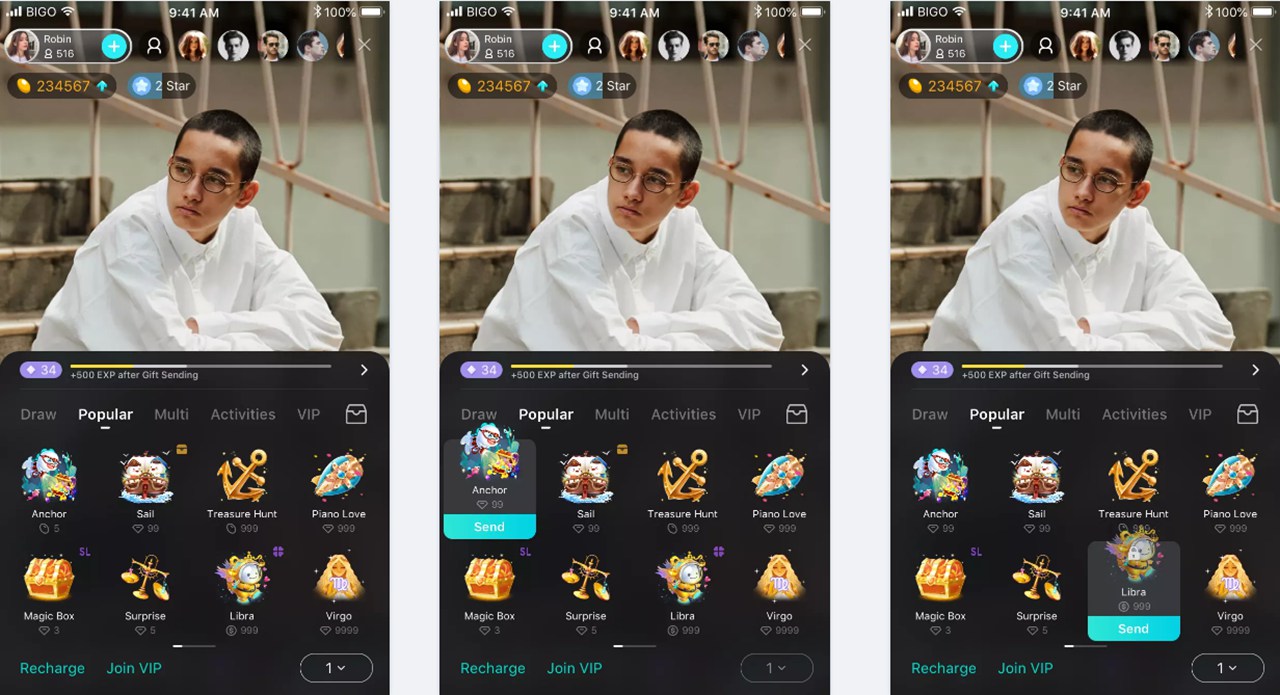
- Acquire Bigo Live's Currency:Before you can send a gift, you need "Diamonds," the in-app currency. Tap the "Recharge" button in the gift panel or go to your profile to purchase Diamond packs.
- Open the Gift Menu:While in a live broadcast, locate the gift box icon at the bottom of the screen. Tapping this icon will open the gift panel, which displays all available presents.
- Explore the Gift Categories:The gift panel is organized into different tabs to help you find what you're looking for.
- Popular:This tab shows the most frequently sent gifts.
- Multi:This allows you to send multiple units of the same gift with a single tap, which is great for making a bigger splash.
- Activities:Here you can find special gifts related to ongoing platform events or holidays.
- VIP:These are exclusive, high-value gifts available only to users with a VIP membership.
- Backpack:This tab holds gifts you may have received for free from Bigo Live through daily tasks or special promotions.
- Select and Send Your Gift:Look through the categories and tap on the gift you wish to send. The price in Diamonds is displayed directly beneath each item. Once you select an item, a "Send" button will become active. Tap "Send" to complete the action. You will see an animation of the gift on the screen, and the broadcaster will receive a notification. Your account will also receive EXP (Experience Points) for the action.
The Role of the Gift Ranking
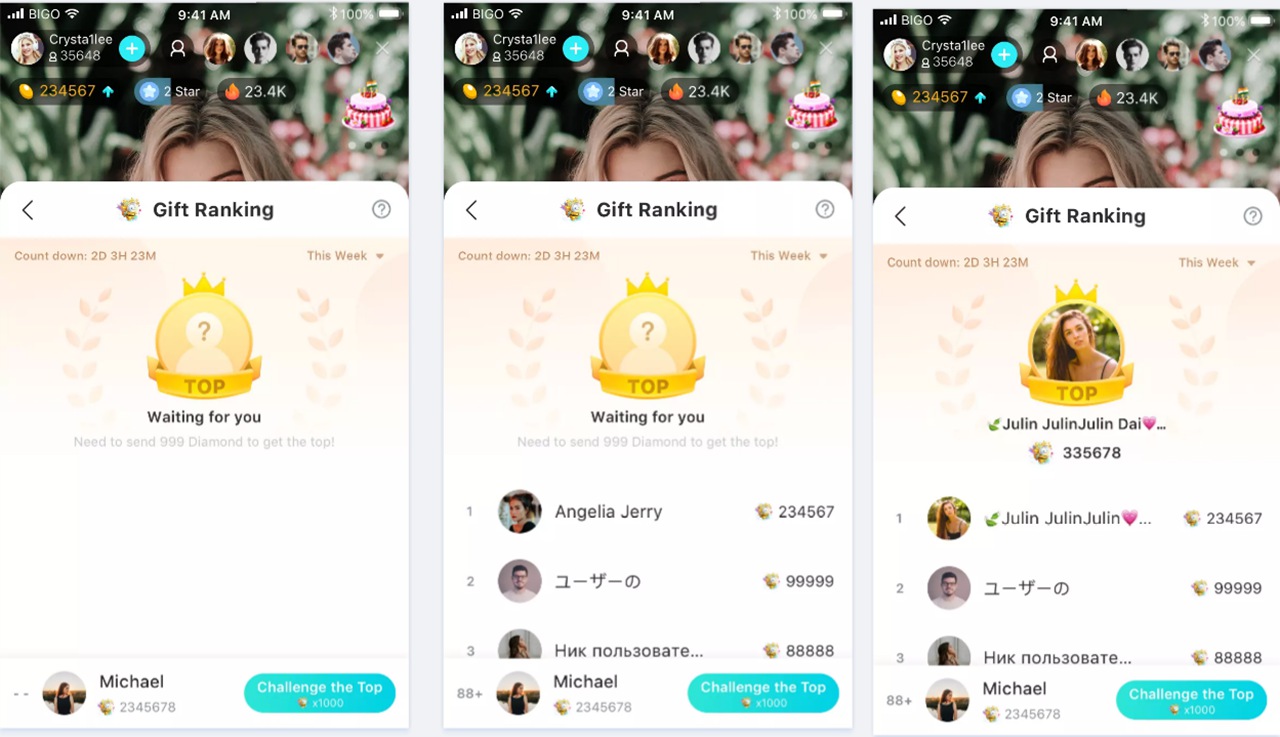
Sending gifts places you on the broadcaster's "Gift Ranking" leaderboard, which adds a competitive and social element to the stream.
- Viewing Your Position:This leaderboard, which is typically reset weekly, displays the top supporters for that creator. You can see your own rank and how close you are to the next spot.
- Becoming a Top Supporter:The more Diamonds you give, the higher your position. The "Challenge the Top" button, as shown in the images, tells you exactly how many Diamonds are needed to overtake the user ranked above you.
- Gaining Recognition:Being a top gifter is a significant form of recognition. Broadcasters often give shout-outs and special attention to their top supporters, creating a closer connection.
Frequently Asked Questions (FAQ)
Q1: What do broadcasters receive when I send a gift?
A: When you send a gift, broadcasters receive "Beans," another type of in-app credit. They can collect Beans and convert them into actual money.
Q2: Can I send gifts for free?
A: Yes. Bigo Live sometimes awards users free gifts for logging in, completing tasks, or participating in events. These are stored in your "Backpack" tab within the gift panel and can be sent just like any other gift, but without costing you any Diamonds.
Q3: Why do some gifts cost more than others?
A: The cost of a gift usually corresponds to its visual effect and the amount of "Beans" the broadcaster receives. More expensive gifts have more elaborate animations and provide greater value to the creator.
Q4: What is the purpose of the EXP I get from gifting?
A: The EXP, or Experience Points, you get from sending gifts contributes to your overall account level. A higher level on Bigo Live is a status symbol that shows you are an active and long-term member of the community.
Conclusion
You now have a complete picture of how Bigo Live’s virtual gift system works. By recharging your Diamonds, choosing from the various gift categories, and sending them during a live stream, you can directly support creators and increase your visibility within their community.
Participating in the gift ranking adds another layer of interaction. Gifting is a key mechanism within the Bigo Live platform that allows for direct appreciation and helps build a strong connection between broadcasters and their audience.
