


Many Bigo Live users start with a default ID made of random numbers. This can feel impersonal and hard to remember. If you want to change your Bigo ID to a unique, catchy username, you might wonder how to do it. The tricky part is making sure your new ID is unique.
In this guide, I’ll show you step-by-step how to change your Bigo ID easily, so you get a cool name that fits you. Read on to discover the simple process—and a bonus tip to make sure your new ID sticks!
Step-by-Step Guide to Changing Your Bigo ID
- Install and Open Bigo Live
If you don’t have the app yet, download it from Google Play Store or Apple App Store.
Open the app and log in with your existing account.
Download BIGO LIVE Now and Live Your Moments!
The choice of over 500 million users, the world's hottest livestreaming platform


Download now and receive an exclusive gift pack for new users!
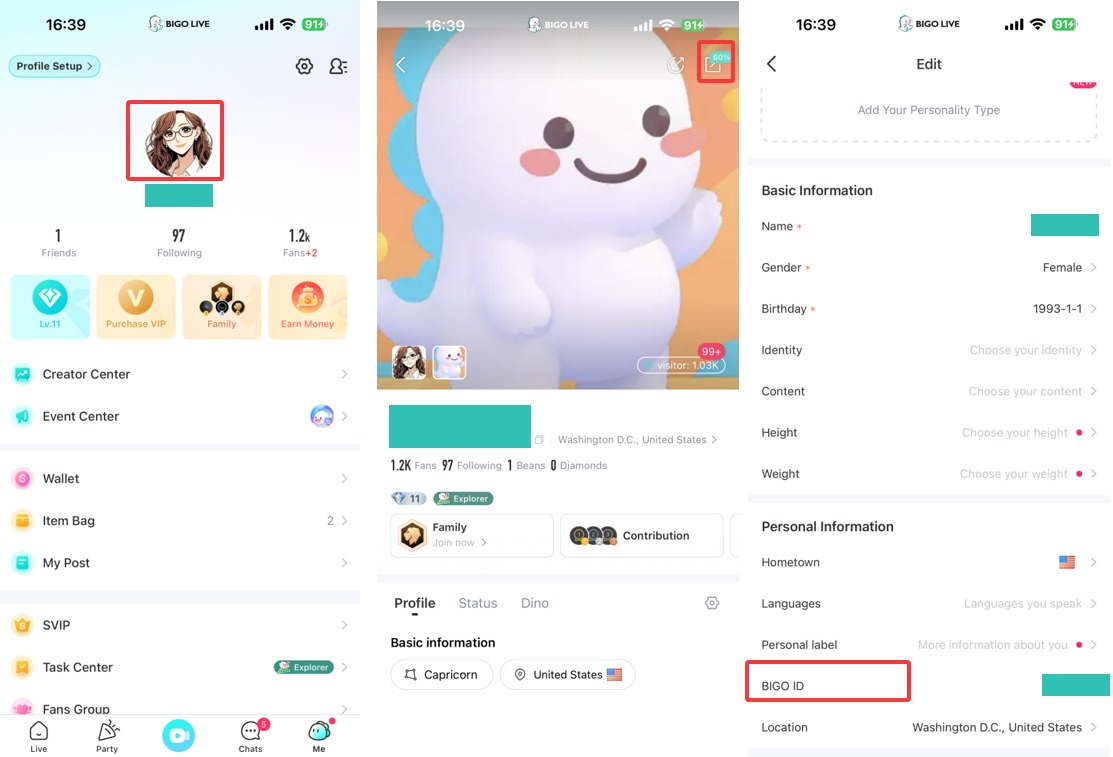
- Go to Your Profile
At the bottom right, tap the “Me” icon to open your profile page.
- Access Edit Mode
In your profile, look for the pen icon at the top right corner and tap it. This will bring you to the profile editing page.
- Find and Tap on Your Bigo ID
Scroll down to find the “Bigo ID” option. Tap on it to enter the editing screen for your ID.
- Choose a Unique New ID
Enter your desired new Bigo ID.
Remember: it must be unique. If someone else already uses it, you’ll need to pick a different one.
- Save Your New Bigo ID
Tap the “Save” button at the top right to confirm your change. Your Bigo ID updates instantly if the name is available.
Conclusion
Changing your Bigo ID is simple and only takes a few taps. Just pick a unique name you’ll love. With a cool new ID, you can stand out and make your profile easier to share. Give it a try today and show off your new identity on Bigo Live!
