


Ever wanted to reconnect with a friend who’s always streaming their guitar covers?
Or maybe you’re itching to follow your favorite comedian’s late-night shows on Bigo Live?
You’re in luck!
With over 500 million users worldwide, Bigo Live is a bustling hub for live streaming—but finding someone specific can feel like searching for a needle in a haystack.
Don’t worry, though! This guide will walk you through foolproof methods to locate anyone on Bigo Live, whether they’re using a username, Bigo ID, or even streaming under a quirky title. Let’s dive in!
Step 1: Download and Install Bigo Live
Before diving into the world of live streams, you'll need the Bigo Live app on your device.
- For Android Users: Visit the Google Play Storeand search for "Bigo Live." Tap 'Install' to download the app.
- For iOS Users: Navigate to the Apple App Storeand look for "Bigo Live." Tap 'Get' to begin the installation.
Step 2: Create or Log In to Your Account
Once installed, open the app. You'll be prompted to sign up or log in.
- New Users: You can register using your phone number, email, or third-party accounts like Facebook or Google.
- Returning Users: Simply enter your credentials to access your account.
Step 3: Connect with Friends via Social Media or Contacts
After logging in, you can connect Bigo Live with your Facebook or phone contacts. This is a great way to find friends who are already using the platform.
(1) Sync Your Phone Contacts
Go to Settings > Friends > Find Contacts. Bigo Live will scan your phone’s contacts and show you who’s already on the platform. This is perfect for reconnecting with old friends or coworkers.
(2) Link Facebook or Instagram
Head to Profile > Settings > Social Media and connect your accounts. Bigo Live will cross-reference your friends list and suggest people to follow.
Step 4: Use the Search Feature Like a Pro
Now, let's talk about finding someone specific.
Tap the magnifying glass icon at the top of the app. Here, you can:
- Type a username(e.g., “GuitarMaster99”).
- Enter a Bigo ID(a unique number like “123456789”).
- Search for live stream titles(e.g., “Late Night Comedy Hour”).
If you’re unsure about the exact username, try variations. For example, if your friend uses “Sarah_Jams,” search “Sarah” and scroll through the results
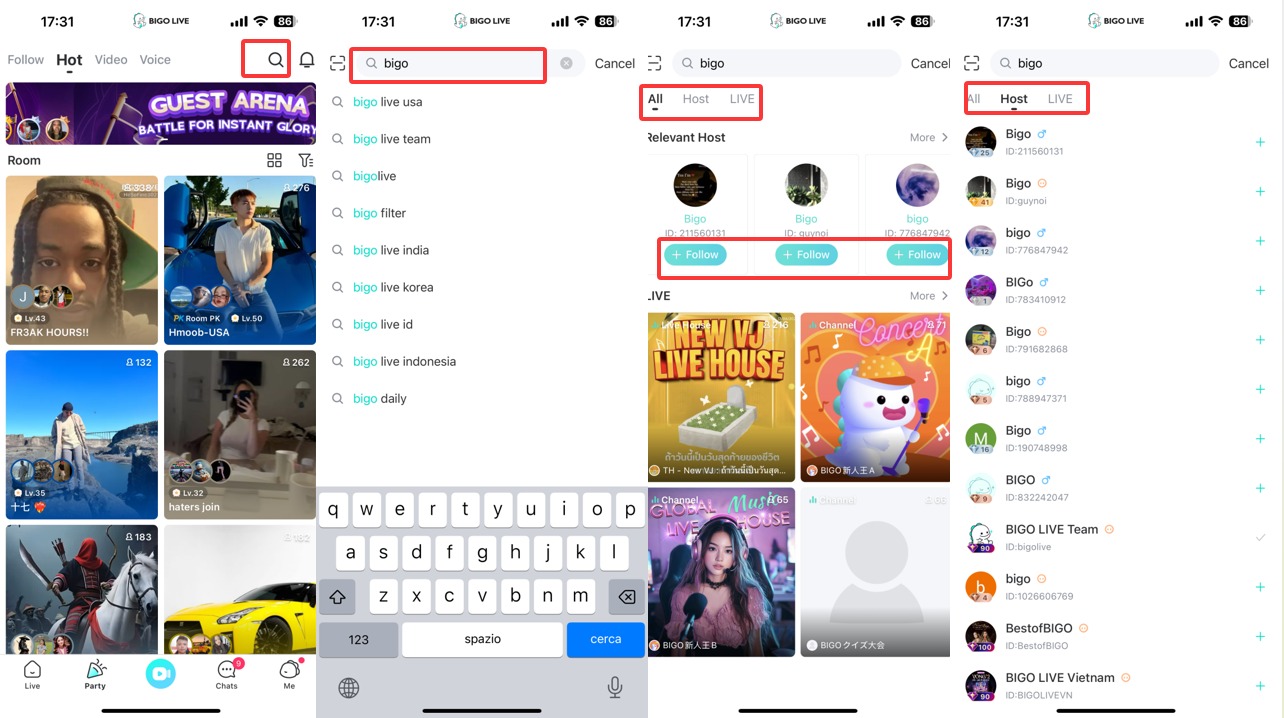
Step 5: Follow and Stay Updated
Once you've found the person you're looking for, you can follow their profile. This means you'll get notifications whenever they go live, so you never miss a stream.
Conclusion: Your Bigo Live Network Awaits!
Whether you’re tracking down a long-lost friend or discovering rising stars in your favorite niche, Bigo Live makes it easy to connect. Remember:
- Double-check usernames and IDs to avoid typos.
- Use social media linking for instant friend suggestions.
- Engage with the community—it’s the fastest way to build (or rebuild) connections.
Ready to start streaming or supporting your favorite creators? Hit that follow button, and never miss a live session again!
