


Let's be real. You're tired of texting. Your thumbs ache, and "LOL" just doesn't cut it anymore. You miss seeing your best friend’s actual laugh, not just reading the letters. You want to show your parents the new puppy, not just send a picture. You need a real, human connection that typed words can't give you.
This is where live video call apps step in. They close the distance, putting faces and voices back into our conversations. But with so many options, which one should you use? Don't worry, I've used them all. Here’s the breakdown of the best live video call apps out there, from a real person who just wants to connect.
Live Video Chat: 12 Popular Apps Compared
1. FaceTime: The Apple Default
For anyone in the Apple ecosystem, FaceTime is the default for a reason. It's built right into every iPhone, iPad, and Mac, meaning there's no app to download or account to create. You tap a button, and you’re connected. Its greatest strength is this sheer, unadulterated convenience for Apple users. The video and audio quality are consistently crisp and reliable for high-quality video communication.
The interface is famously minimal. During a call, the controls for muting, flipping the camera, and ending the call are right there, but they fade away so you can focus on the conversation. It’s not cluttered with a million buttons you’ll never use.
Group FaceTime is a great feature, letting you chat with up to 32 people at once, and the person talking automatically gets a larger tile. For more interactive online video calls, SharePlay lets you watch movies, listen to music, or share your screen with friends, all perfectly in sync. While it’s best for Apple users, the recent addition of FaceTime links allows Android and Windows users to join from a browser, which is a nice step toward inclusivity.
Who's It For?
Families, friends, and colleagues who all use Apple devices. It's the no-brainer choice for quick, high-quality, one-on-one or small group chats within that circle.

2. WhatsApp: The Global Connector
WhatsApp is the Swiss Army knife of communication. With over 2 billion users, it’s practically a given you can reach anyone in your phonebook with it. This unmatched global user base is what makes this live video call app so essential. It works perfectly on both iPhone and Android, and all calls and messages are secured with end-to-end encryption.
Starting a video call is just one tap away from your text conversation, making the transition from texting to talking seamless. The on-screen controls are simple: a few buttons at the bottom for mute, camera off, and adding more people to the group video call (up to 32). There's nothing confusing here. A handy picture-in-picture mode lets you minimize the video screen to reply to another message or look something up without ending the call. Because it’s free over Wi-Fi, it has become the king of international communication.
Who's It For?
Everyone, especially those with friends and family abroad. It’s the default messenger for much of the world, so its video calling is a natural and essential extension of that.
3. Zoom: The Meeting Powerhouse
Zoom became a household name for its power in group video conferencing. It’s built for stability, especially with large groups. While it started as a business tool, it’s now the standard for everything from online classes to virtual family reunions. It’s less about a quick, casual chat and more about a scheduled, organized video event. The free version generously lets you host up to 100 people for 40 minutes.
Its interface is more of a dashboard than a simple call screen. This can be overwhelming for new users, but this density of options is precisely its strength, offering unmatched control for large online video calls.
Features like Virtual Backgrounds, easy screen sharing, and Breakout Rooms for splitting a large group into smaller discussions make it a premier video conferencing solution. The ability to easily record meetings is also a major plus for professional and educational use.
Its reliability with dozens of participants is where it truly shines, handling big groups far more smoothly than many competitors.
Who's It For?
Remote workers, students, and anyone needing to organize a large virtual gathering. If you’re hosting a book club or a family holiday call with 20+ relatives, Zoom is your best bet.
4. Google Meet: The G-Suite Standard
If you live in the Google ecosystem (Gmail, Google Calendar), Google Meet offers a streamlined video chat experience. It’s less about flashy features and more about solid, reliable performance that’s incredibly easy to access. Its biggest advantage is the tight integration with other Google services. You can create a meeting and send a Google Calendar invite in one go, or even start a call directly from a Gmail thread.
It has a classic, clean Google design that’s intuitive and far less intimidating than Zoom's dashboard of options. People can join easily from their browser without downloading an app, which is a huge plus for accessibility. The free tier is generous, allowing up to 100 people for 60 minutes.
A truly standout feature is its live, AI-powered captioning, which is surprisingly accurate and amazing for making calls more accessible to everyone.
Who's It For?
Small businesses, students, and anyone who uses Gmail and Google Calendar heavily. It's a fantastic, no-fuss option for professional meetings and study groups.
5. Discord: The Community Hangout
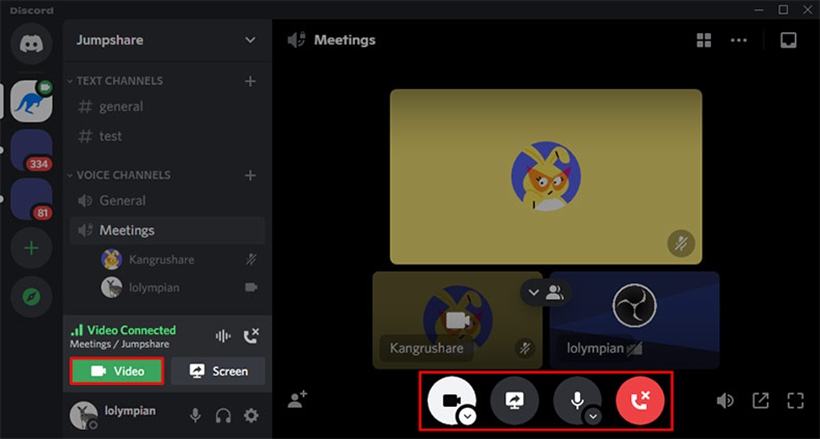
Discord began as a haven for gamers but has grown into a powerful community hub. It’s not just an app for making a video call; it’s a permanent home for your communities. You join "servers" dedicated to specific interests—gaming, art, or just a group of friends—and the video calling happens within these persistent hangout spots.
The three-column layout (servers, channels, chat) can look busy at first, but for its users, this information density is a strength. This always-on structure is what makes it unique. It’s less a 'calling app' and more a virtual clubhouse for your face-to-face calls. You can just drop into a voice channel to see who's around.
Its original claim to fame was high-quality, low-latency voice, and its video quality is just as strong. The "Go Live" feature lets you easily stream your game or screen to a channel for friends to watch, making it a fantastic tool for shared experiences.
Who's It For?
Gamers are still the core audience, but it's perfect for any group that wants a dedicated, shared online space for both text and live video chat.
6. Bigo Live: The Global Stage
Bigo Live shifts the focus from private video calls with people you know to public live streaming and discovery. It’s a platform where you can be a viewer or a broadcaster, connecting with a global community. The platform is a vibrant, active place where you can watch people sing, dance, chat, or share their skills in real-time.
The user interface is a colorful, energetic grid of active streams, built to encourage you to tap on something interesting. Its unique selling point is this focus on entertainment and creating a global stage. Key features include Multi-Guest Rooms, where a broadcaster can invite up to 11 others to join their stream in a talk-show-like video chat. Another popular feature is PK (Player Knockout) battles, where two broadcasters compete for audience engagement.
This isn't your typical live video call app; it's a platform for creators and those seeking live entertainment.
Who's It For?
Aspiring creators, people who love watching live performances, and anyone who wants to meet new people from different backgrounds in a public, social setting.
🎉 Join 500 Million People Worldwide! New Users Download Now for an Exclusive Gift! 🎉

BIGO LIVE: Live Your Moments
Don't miss any trending content! Join 500 million friends from around the world and enjoy live streaming fun!


7. Skype: The Old-Timer That Still Delivers
Skype is the original titan of online video calls, and for many, it was their first-ever experience with video communication. While newer apps have stolen some of its thunder, Skype remains a solid, reliable workhorse. It’s available on basically every device imaginable—phones, tablets, computers, and even smart TVs.
While the modern interface is much cleaner than it used to be, its legacy and unique capabilities keep it relevant. The standout feature is its Skype-to-Phone calling, which lets you call actual landlines and mobile numbers worldwide for a small fee. This is a powerful tool many competitors lack.
It also offers real-time translation for voice calls and text chats, breaking down language barriers. The "Meet Now" feature lets you generate a meeting link that anyone can join, even without a Skype account, making it a surprisingly nimble tool for quick group video calls.
Who's It For?
People who need a reliable, cross-platform solution, and especially those who need to call international phone numbers cheaply.
8. Telegram: The Security-Focused Messenger
Telegram built its brand on speed and security, and its video calling feature is no different. It’s fast, clean, and respects your privacy. While other apps have added encryption, it has been Telegram's core principle from the start, making it a trusted name for secure video chat. All one-on-one video calls are end-to-end encrypted.
The interface is famously fast and minimalist, focusing purely on the conversation without extra frills. It's uncluttered and highly responsive. In addition to private calls, its group video calls are impressive, supporting up to 1,000 viewers, with the first 30 able to broadcast their camera and screen. This makes it a powerful tool for community broadcasts or virtual events. This uncompromising commitment to privacy and its ability to handle massive groups are its core differentiators in a crowded field of video communication apps.
Who's It For?
Privacy-conscious users and large communities that need a mix of powerful text-chat features alongside reliable group video calls.
9. Signal: The Privacy Benchmark
When privacy is absolutely non-negotiable, Signal is the top choice for secure live video calls. It is widely regarded by security experts as the gold standard for private communication, thanks to its open-source and independently audited Signal Protocol, which also powers the encryption in WhatsApp and others.
The interface is intentionally spartan. It’s clean, simple, and free of fluff like stickers or filters. The focus is 100% on secure communication. Signal's entire identity is built on being the most private communication tool available—it collects virtually no user data. Its video and voice calls are always end-to-end encrypted, and the quality is excellent. For a straightforward, high-security face-to-face call, nothing else provides the same peace of mind.
Who's It For?
Journalists, activists, and anyone for whom privacy is the most important feature. It's for users who want to be sure their conversations are for their eyes and ears only.
10. Instagram: The Social Media Video Chat
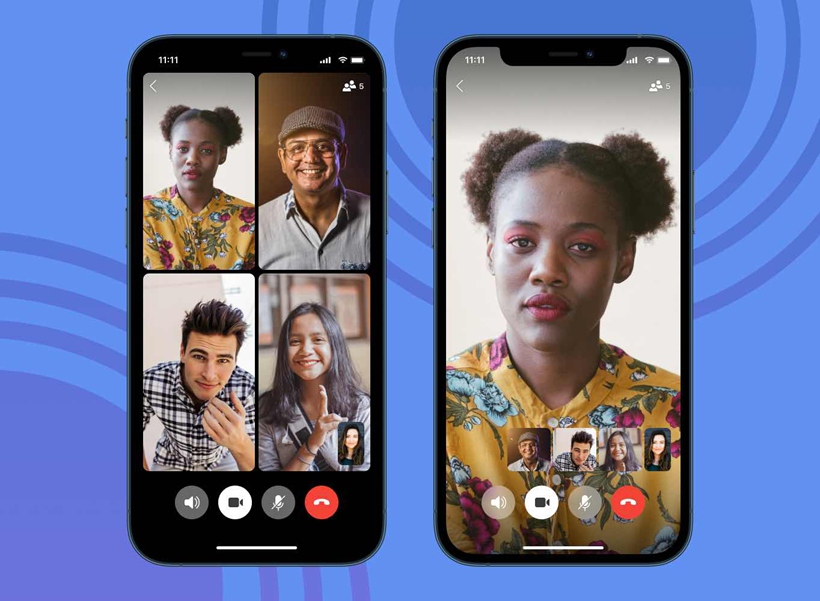
For billions of users, live video chat is now happening right inside their Instagram Direct Messages. Instead of being a standalone app, Instagram’s video calling is a feature woven directly into the social fabric of the platform, making it incredibly convenient for its massive user base.
The video call button is conveniently located within any DM chat, allowing for spontaneous face-to-face calls with friends and followers. Its power comes from leveraging the massive, existing social graph of Instagram. You don't need a phone number; you just need to be connected on the app.
During a call, you can use a vast library of AR filters, and a "Watch Together" feature lets you co-view Reels and other video content with friends, making it a fun and engaging social experience.
Who's It For?
Active Instagram users, especially a younger demographic, who want a quick, fun, and visually-driven way to have a live video call with their online friends.
11. Viber: The Feature-Rich Global Messenger
Viber is another major player in the global messaging and video calling space, often seen as a direct competitor to WhatsApp. It boasts a huge user base, particularly in parts of Europe, Asia, and the Middle East, and offers free, encrypted video and voice calls to other Viber users.
The interface is bright and colorful, with a heavy emphasis on stickers and GIFs to liven up chats. It stands out with features like "Viber Out," a service similar to Skype's that allows you to make low-cost calls to non-Viber users on landlines and mobiles. It also supports "Communities," which are massive super-groups that can have an unlimited number of members, where admins have more control than in a standard group chat.
The video call quality is solid, making it a dependable choice for both personal and group chats.
Who's It For?
Users looking for a full-featured alternative to WhatsApp, especially those who want to make cheap international calls or engage with large, topic-based communities.
12. Facebook Messenger: The Convenient Social Hub
If you're on Facebook, you already have a powerful video call app at your fingertips. Like its sibling Instagram, Messenger's video calling is built into the app you already use to chat with your Facebook friends. Its greatest asset is tapping directly into your existing network of friends, old classmates, and relatives.
Its "Messenger Rooms" feature is a powerful tool for group video calls, allowing you to create a link that can be shared anywhere. People don't even need a Facebook account to join the call, making it a surprisingly open video conferencing solution.
The app is also packed with fun AR effects and filters, and the "Watch Together" feature lets you stream Facebook Watch content with friends during a call. It’s the path of least resistance for a live video call with anyone in your Facebook circle.
Who's It For?
Active Facebook users of all ages. It’s perfect for casual, spontaneous chats with your entire social media network.
So, Which App Should You Use?
There's no single "best" live video call app. It all comes down to what you need in that moment.
- For quick, high-quality calls with your Apple-using family and friends? It's FaceTime, no question.
- For connecting with anyone, anywhere in the world, on any phone? WhatsApp is your global passport.
- For a big, organized group meeting for work or a club? Zoom or Google Meet are your professional-grade tools.
- For an always-on hangout spot for your gaming squad or hobby group? Discord is your clubhouse.
- For broadcasting yourself to the world or discovering new live entertainers? Bigo Live is your stage.
- For the absolute highest level of privacy and security? Signal is the benchmark.
- For a casual call with a Facebook or Instagram friend? The option is built right into Messenger and Instagram DMs.
The goal isn't to pick one and delete the rest. The modern way to connect is to have the right tool for the right job. So go ahead, see your friends’ faces, hear their voices, and close that distance with a better kind of video communication. It’s only a tap away.
