


You logged onto Bigo Live for some fun, but suddenly you see something that’s definitely not okay – maybe it’s a streamer breaking rules, or someone being abusive in the chat. Your gut says "this isn't right," but what's next?
Knowing how to report on Bigo Live is key to keeping the platform safer for everyone. This guide will show you exactly how to do it, step by step, so you can act confidently.
Why Bother Reporting on Bigo Live?
Reporting isn't about being a tattletale; it's about community safety. Bigo Live has Community Guidelines designed to make the platform a positive space.
When users violate these rules – through hate speech, harassment, explicit content, or other prohibited activities – reporting them helps Bigo's moderation team take action.
This can include removing content, or issuing warnings, account restrictions, or even bans to the offending user. Your reports contribute directly to a better environment for everyone.
How to Report on Bigo Live?
Bigo Live allows you to report various types of content and users. The process is slightly different for each.
1. Report a Live Broadcast
When you encounter inappropriate content or behavior during a live broadcast:
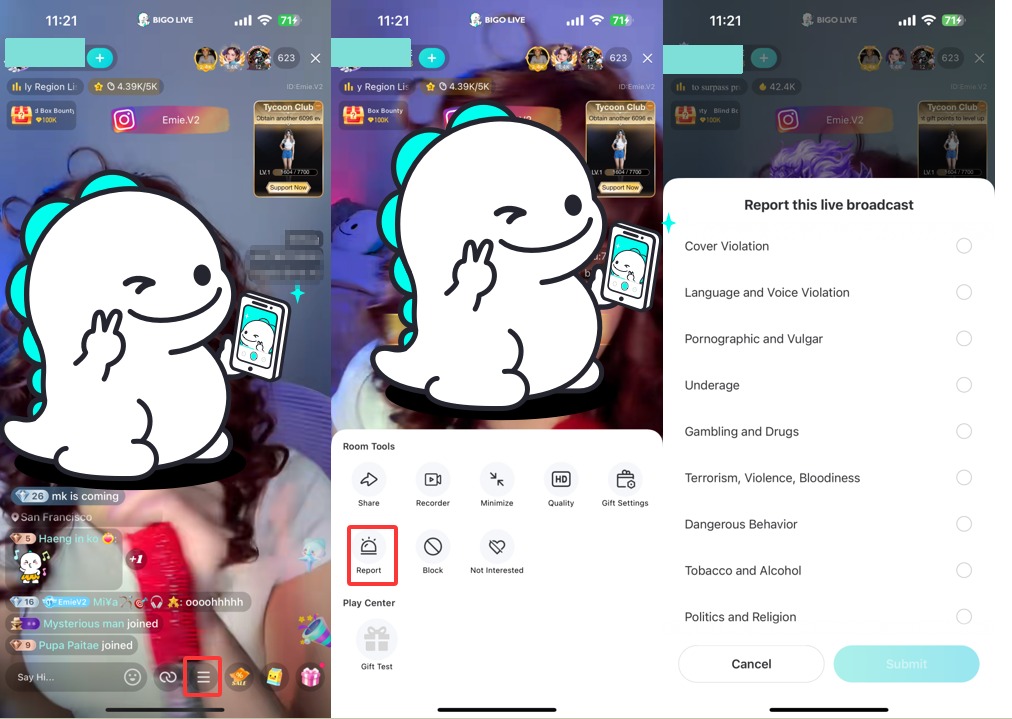
(1) Access Room Tools: During the live stream, look for a menu icon at the bottom of your screen. This is often represented by three horizontal lines (≡). Tap this icon.
(2) Open Report Options: Tapping the menu icon will open the "Room Tools." Within these tools, locate and tap the "Report" icon.
(3) Select the Reason for Reporting: A screen titled "Report this live broadcast" will appear. You'll see a list of violation categories. These typically include:
- Cover Violation
- Language and Voice Violation
- Pornographic and Vulgar
- Underage
- Gambling and Drugs
- Terrorism, Violence, Bloodiness
- Dangerous Behavior
- Tobacco and Alcohol
- Politics and Religion
- Others
Select the radio button next to the reason that best describes the violation you are witnessing.
(4) Submit the Report: Once you've selected the reason and added any necessary details, tap the "Submit" button.
2. Reporting Private Chat/Message
When you receive an offensive or rule-violating message:
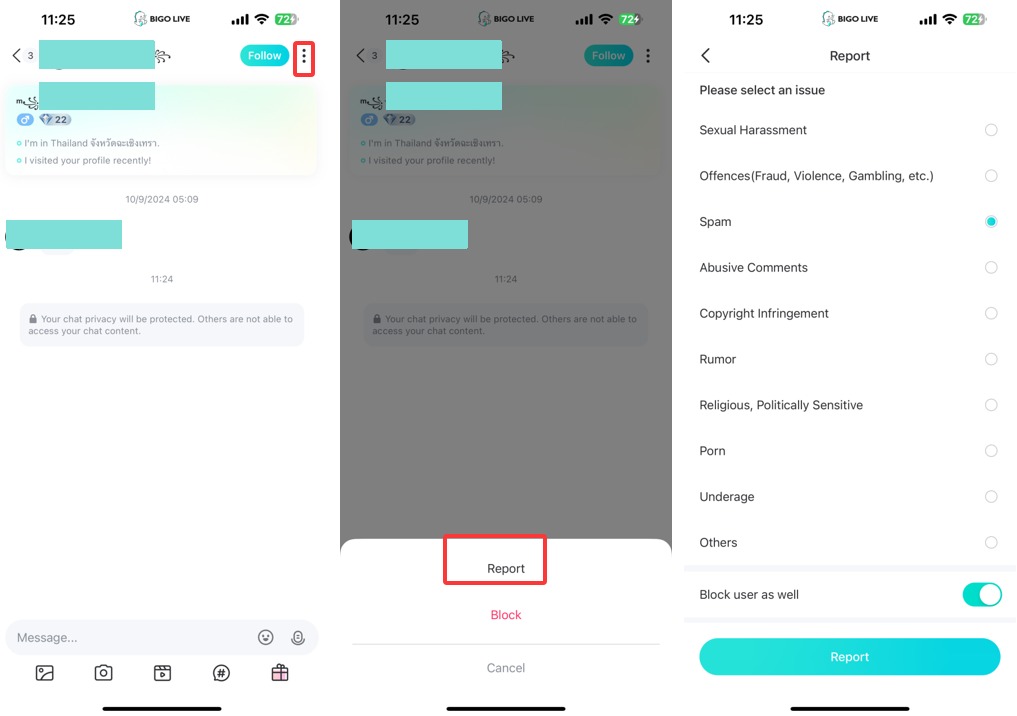
(1) Access Chat Options: Open the private chat with the user you wish to report. Look for a menu icon, typically represented by three vertical dots (⋮), usually located in the top right corner of the chat screen. Tap this icon.
(2)Choose to Report (or Block): After tapping the three dots, a small menu will appear at the bottom of the screen. You will see options like "Report" and "Block." To proceed with reporting, tap "Report."
Note: You can also choose to just "Block" the user from this menu if you don't want to file a report but wish to prevent further contact. Blocking will prevent them from sending you messages or viewing your profile.
(3)Select the Issue: Tapping "Report" will take you to a new screen titled "Report" with the instruction "Please select an issue." You'll see a list of violation categories. These can include:
- Sexual Harassment
- Offences (Fraud, Violence, Gambling, etc.)
- Spam
- Abusive Comments
- Copyright Infringement
- Rumor
- Religious, Politically Sensitive
- Porn
- Underage
- Others
Tap the radio button next to the category that best describes the violation. For example, if the user sent abusive messages, you would select "Abusive Comments."
(4) Optional: Block User as Well: On this "Report" screen, you'll also see a toggle option: "Block user as well." If you want to block this user in addition to reporting them, make sure this toggle is switched to the "on" position. This is a convenient way to perform both actions at once.
3. Reporting a User Profile
If a user's profile itself contains offensive material (like an inappropriate avatar or bio) or if the user has a history of bad behavior, you can report the entire profile.
- Navigate to the User's Profile:You can usually do this by tapping their username in a stream, a comment, or from a search.
(2) Find the 'More' or 'Manage' Option: Look for an icon, often three dots (●●●) or a similar menu symbol, usually in the top right corner of their profile page.
(3) Select 'Report': This option will typically be in the dropdown menu.
(4) Choose the Reason for Reporting: Bigo Live will provide a list of violation categories (e.g., " Avatar violation," "Intellectual Property Infringement," "Nickname violation"). Select the one that best fits the situation.
(5) Submit the Report: Click the "Submit" button.
4. Reporting Via Email (For More Complex Cases)
For issues that are harder to explain through in-app forms, or if you have extensive evidence, you can email Bigo Live's support team.
Email Address: feedback@bigo.tv
Subject Line: Make it clear, e.g., "Report of Violation - User ID [User's ID]."
Body of the Email:
- Clearly state the Bigo ID and username of the person you are reporting.
- Describe the violation(s) in detail, including dates and times.
- Attach any screenshots or video evidence you have.
- Explain why the content or behavior violates Bigo's Community Guidelines.
This method can be useful if you need to report multiple incidents or provide more context than the in-app form allows.
No matter which method you use, being accurate and providing as much relevant information as possible is key. But what actually happens once you click "submit"?
What Happens After You File a Report?
Once you submit a report, Bigo Live's moderation team is responsible for reviewing it. We often uses a combination of automated systems and human moderators to assess reported content and behavior against our Community Guidelines.
Here’s a general idea of the process:
(1) Receipt & Initial Review: Your report is received and logged. Automated systems might flag obvious violations or prioritize reports.
(2) Investigation: Human moderators will likely review the reported content/user and the information you provided. They will check if it indeed violates Bigo Live's policies.
(3) Action Taken (If Violation Confirmed): If a violation is found, Bigo Live may take a range of actions. These can include:
- Removing the offending content (e.g., a video, comment, or profile picture).
- Issuing a warning to the user.
- Temporarily restricting the user's account features (e.g., ability to stream or comment).
- Suspending the user's account for a period.
- Permanently banning the user's account or even their device in severe or repeated cases.
- In cases involving illegal activities, especially concerning the exploitation or abuse of minors, Bigo Live will report the information to relevant authorities like law enforcement or organizations.
The time it takes to review a report can vary depending on the volume of reports and the complexity of the case. Bigo Live aims to address reported issues as quickly as possible.
Frequently Asked Questions (FAQ)
Here are some common questions about reporting on Bigo Live:
