


 Official Android APK Guide
Bigo Live is one of the world's most popular live streaming platforms, with over 700 million users globally. Whether you want to watch talented creators from around the world or broadcast your own content, downloading the Bigo Live APK gives you the fastest, most flexible way to get started on Android.
Download via our official source to help avoid unsafe third-party APK files.
What Is the Bigo Live APK?
An APK (Android Package Kit) is the installation file format used by Android devices. Instead of downloading Bigo Live through the Google Play Store, the Bigo Live APK lets you install the app directly from the official source — giving you broader device compatibility and instant access to the latest version.
The APK method is especially useful in three scenarios:
- Your device has limited or no access to the Google Play Store
- You want immediate access to the newest features before they roll out regionally
- You're in a region where the app isn't yet listed on the Play Store
System Requirements
Before downloading, confirm your device meets the minimum requirements:
| Requirement | Minimum Spec |
|---|---|
| Android Version | Android 5.0 or higher (Android 12L recommended) |
| Free Storage | At least 200 MB |
| Internet Connection | Wi-Fi recommended (APK file is ~150–200 MB) |
If your device is low on storage, consider Bigo Live Lite — a slimmed-down version that's only 15 MB and still includes core features.
How to Download & Install the Bigo Live APK
Step 1: Enable Unknown Sources
Android blocks APK installs from outside the Play Store by default. To allow it:
- Open Settings on your Android device
- Go to Security or Privacy (label varies by manufacturer)
- Toggle on Unknown Sources or Install Unknown Apps
- Select your browser and grant installation permission
Step 2: Download the Official Bigo Live APK
- Open your mobile browser (Chrome, Firefox, or Samsung Internet)
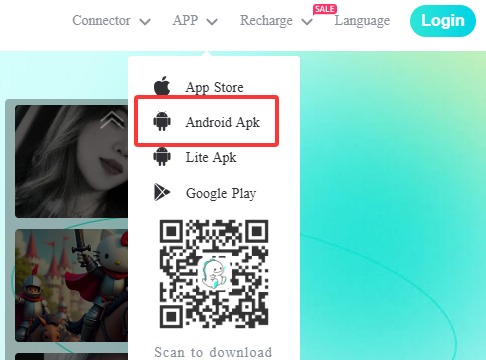
- Navigate to the official Bigo Live download page at bigo.tv
- Tap the Android APK download button
- Wait for the file to finish downloading
Step 3: Install the APK File
- Open File Manager or My Files on your device
- Navigate to the Downloads folder
- Tap the Bigo Live APK file
- Select Install and follow the on-screen prompts
If you see a security warning, simply verify that the file was downloaded from the official site and proceed — this prompt appears for all APK installs outside of the Play Store.
Step 4: Launch & Set Up Your Account
- Find the Bigo Live icon in your app drawer and tap to open it
- Log in if you have an existing account, or tap Sign Up
- Register using your phone number, email, Facebook, Google, or Twitter
- Complete your profile with a photo and bio
- Start watching streams — or go live yourself!
APK vs. Play Store: Which Should You Choose?
| Aspect | Bigo Live APK | Google Play Store |
|---|---|---|
| Update Speed | Immediate access to latest version | May lag by 1–3 days |
| Regional Access | Available in all countries | May be restricted in some regions |
| Installation Ease | Requires manual permission steps | One-tap install |
| Automatic Updates | Manual updates required | Auto-updates available |
| Device Compatibility | Works on more devices | May exclude older models |
For most users in regions where the Play Store is fully available, either method works well. The APK route is the preferred choice for users on older devices or in regions with restricted access.
Troubleshooting Common APK Install Issues
1. "Installation Blocked" message
Go to Settings → Security and confirm "Unknown Sources" is enabled for your specific browser. Some Android skins (e.g., MIUI, OneUI) require per-app permissions rather than a global toggle.
2. "App Not Installed" error
This usually means the APK file was corrupted during download. Delete the file, clear your browser cache, and re-download from the official site. Also check you have sufficient storage space.
3. APK file won't open
If your device lacks a built-in file manager, install one — Files by Google is a free and reliable option.
Safety & Community Guidelines
Bigo Live enforces strict community standards across its platform. Before streaming or interacting with others, keep these key safety tips in mind:
- Never share personal details (address, phone number) during live streams
- Use the Report button if you encounter inappropriate content
- Bigo Live is a social entertainment platform — keep interactions respectful and within community guidelines
