


You can delete your BIGO LIVE account in the app by going to Settings > Account Management > Delete Account, then following the on-screen checks and confirming the account deletion agreement. This is a permanent action. After the account is deleted, you will not be able to log in again, reactivate the account, or restore your profile, messages, gifts, followers, virtual currency, or other account content.
Before you continue, make sure you are signed in to the exact BIGO LIVE account you want to close. If you only want fewer messages, fewer notifications, or more privacy, you may not need to delete the account. You can first review your privacy settings, message controls, and notification settings.
To manage or close your account on a new device, download BIGO LIVE and sign in to the exact account you want to review.
Before You Delete Your BIGO LIVE Account
Account deletion is easier when your account has no open balances, duties, or disputes. Check these items first:
- Save anything you still need. Back up photos, videos, messages, payment records, support case numbers, or creator records before deleting the account.
- Check Diamonds and Beans. If you have unused Diamonds, unwithdrawn Beans, or other virtual currency, your deletion request may be rejected. Review your balance before applying.
- Review creator or agency duties. If you are a streamer, broadcaster, creator, agency member, or partner with a separate agreement, BIGO LIVE may refuse deletion until those duties are cleared.
- Give up family leader status if needed. If you are a family leader, your role may affect other members, so the request may be declined until you give up that status.
- Resolve open disputes. Pending settlements, complaints, reports, legal issues, or account disputes can delay or block deletion.
- Secure the account first if it was hacked. BIGO LIVE may not process deletion requests for hacked, misused, compromised, fraudulent, or illegal accounts.
Step-by-Step Guide to Deleting Your BIGO LIVE Account
Follow these steps to permanently delete your BIGO LIVE account directly through the app:
-
Open the BIGO LIVE App
Launch the BIGO LIVE app on your device.
-
Log in to Your Account
Enter your username and password to access the account you wish to delete.
-
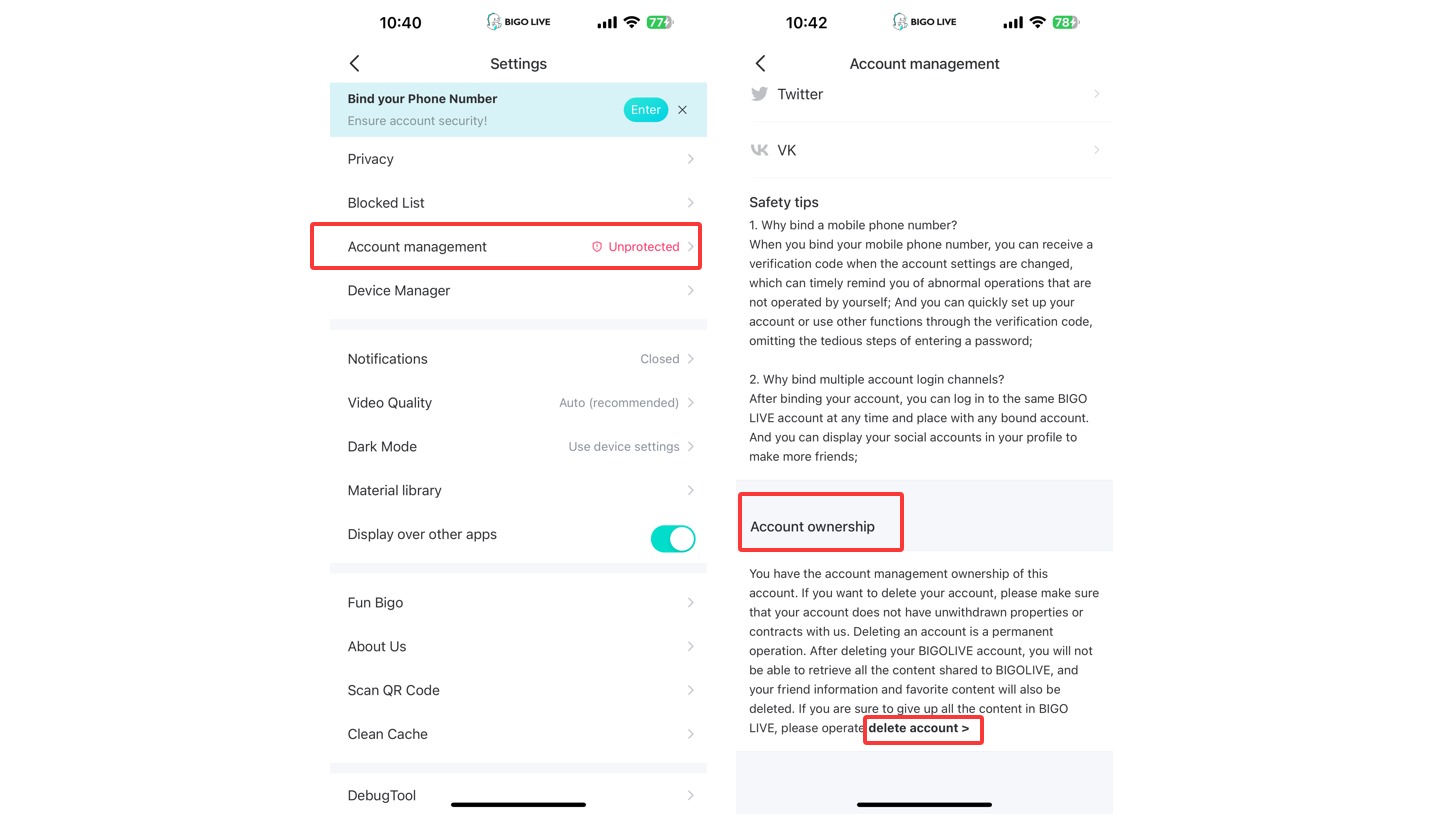
Navigate to Settings > Account Management
Tap on the settings gear icon, which is located at the top of right of the screen. Then, in the settings menu, look for the option "Account Management".
-
Locate the Delete Account Option
Within Account Management, scroll down and find the "Delete Account" option under account ownership.
-
Review Deletion Conditions
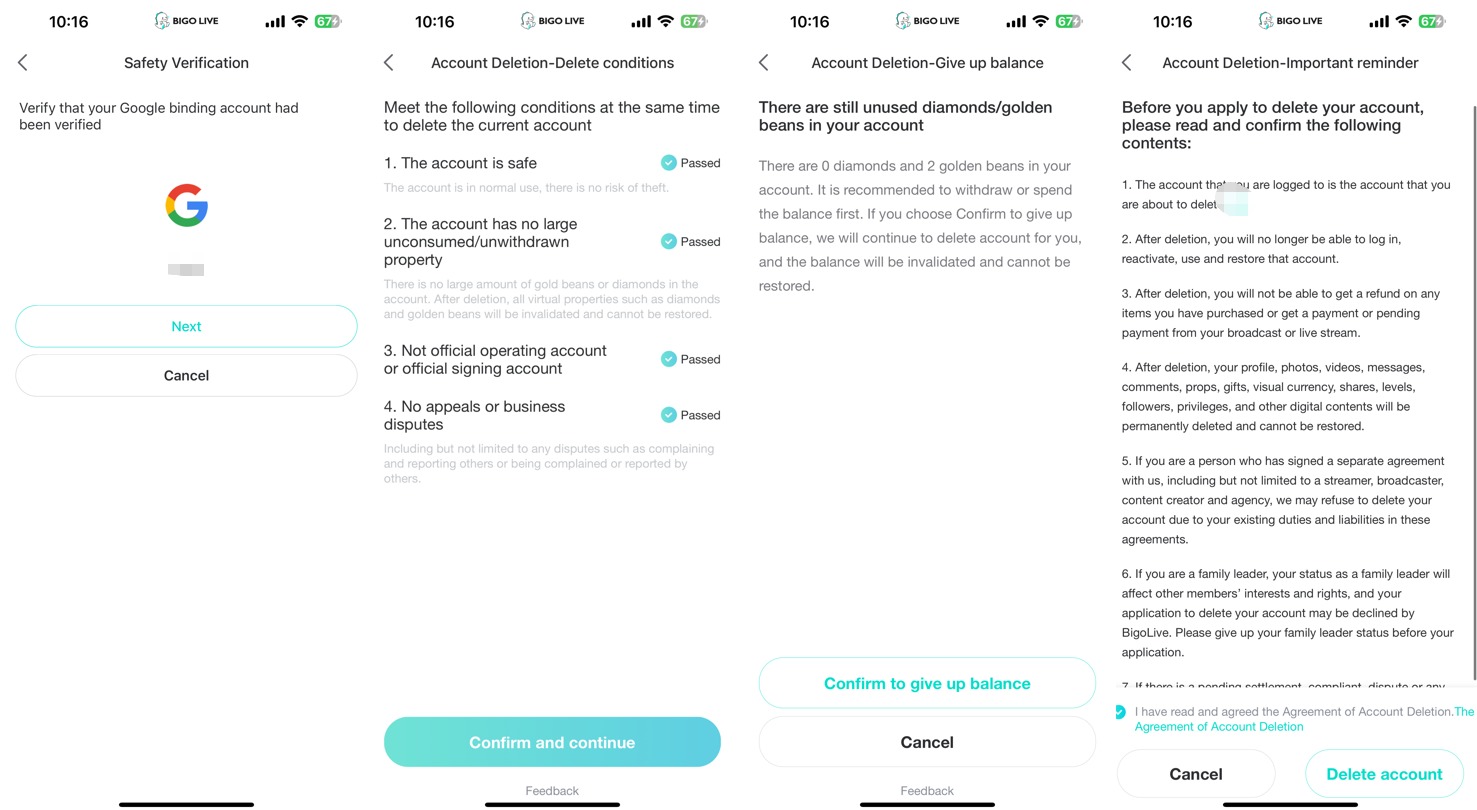
The app will present conditions for account deletion (e.g., account safety, no unwithdrawn property, not an official/signed account, no pending disputes). Ensure you meet these criteria and tap "Confirm and Continue".
-
Read the Deletion Agreement
Carefully read the on-screen instructions and the Agreement of Account Deletion provided by BIGO LIVE.
-
Confirm Deletion
If you agree to the terms, tap the checkbox to confirm you've read the agreement and then tap "Delete Account". You may need to confirm your decision again in a pop-up window.
After you submit the request, the account will be scheduled for deletion or reviewed by BIGO LIVE. If the account has a problem such as remaining Beans, a creator agreement, family leader status, or an open dispute, the request may be rejected or paused.
What Will Be Removed?
When your account is deleted, you lose access to the account and its content. According to BIGO LIVE's deletion terms, this can include:
- Your profile.
- Photos and videos.
- Messages and comments.
- Props and gifts.
- Diamonds, Beans, or other virtual currency.
- Shares, levels, followers, privileges, and account content.
Once the deletion is processed, these items cannot be restored. If you are unsure, pause before the final confirmation and save anything important first.
Why Your Deletion Request May Be Rejected
Your deletion request may fail if BIGO LIVE still needs to review something connected to the account.
| Possible issue | What to do |
|---|---|
| You still have Diamonds, Beans, or account balance | Use, withdraw, or review the in-app forfeiture terms where available |
| You are a creator, broadcaster, agency member, or partner | Check your agreement or contact your agency/support contact |
| You are a family leader | Give up or transfer the role before applying |
| You have a pending settlement, complaint, or dispute | Resolve the open case before applying again |
| Your account was hacked or misused | Recover and secure the account first |
| Your account is tied to a legal report or proceeding | Wait for the review or contact support with your case details |
If your request is rejected, read the reason shown in the app. Fix that issue first, then try again.
If You Only Want More Privacy
Deleting your account is not always the best first step. If you mainly want fewer messages, less profile exposure, or fewer alerts, try privacy controls first. The BIGO LIVE privacy settings checklist explains how to limit stranger messages, hide certain profile details, and reduce unwanted contact.
If you simply want a break, you can log out or remove the app from your phone. Deleting the account should be saved for when you are sure you want to close it permanently.
FAQ
1. Can I recover my BIGO LIVE account after deleting it?
No. After the account is deleted, you cannot reactivate it or restore the removed account content.
2. Is deleting the app the same as deleting my account?
No. Deleting the app only removes it from your device. Your account can still exist unless you submit an account deletion request.
3. Where is Delete Account in BIGO LIVE?
Go to Settings > Account Management > Delete Account in the BIGO LIVE app.
4. Why does BIGO LIVE ask about Diamonds and Beans?
Diamonds, Beans, and other virtual currency can affect account deletion. If you still have balances, the request may be rejected.
5. Can a creator or agency account be deleted?
It may be possible, but any creator, broadcaster, agency, or partner duties must be cleared first.
6. What should I do if my account was hacked?
Recover and secure the account before requesting deletion. A hacked or misused account may not be accepted for deletion until the security issue is handled.
7. How do I contact BIGO LIVE about deletion?
Use in-app Help & Feedback or email feedback@bigo.tv with your BIGO ID, screenshots, and a clear description of the issue.
