


BIGO is huge, with over 600 million users, which means you're bound to run into a few "bad apples." The platform uses advanced AI to catch 99.5% of the gross stuff, but you need to do the rest to stay 100% safe.
You deserve to stream without some random troll ruining the vibe. By following this guide, you’ll build a virtual wall that keeps the creeps out while letting your real fans in. You just need an active account and a few minutes to tweak your privacy settings. If you haven't joined yet, download BIGO LIVE to get started safely.
Quick Glance: Core Safety Info
- ✓ Privacy First: Hide location and online status to stay anonymous.
- ✓ Stranger Control: Block messages from non-friends automatically.
- ✓ Community Power: Use admins and reports to keep your room clean.
Steps to Prevent Harassment on Bigo Live
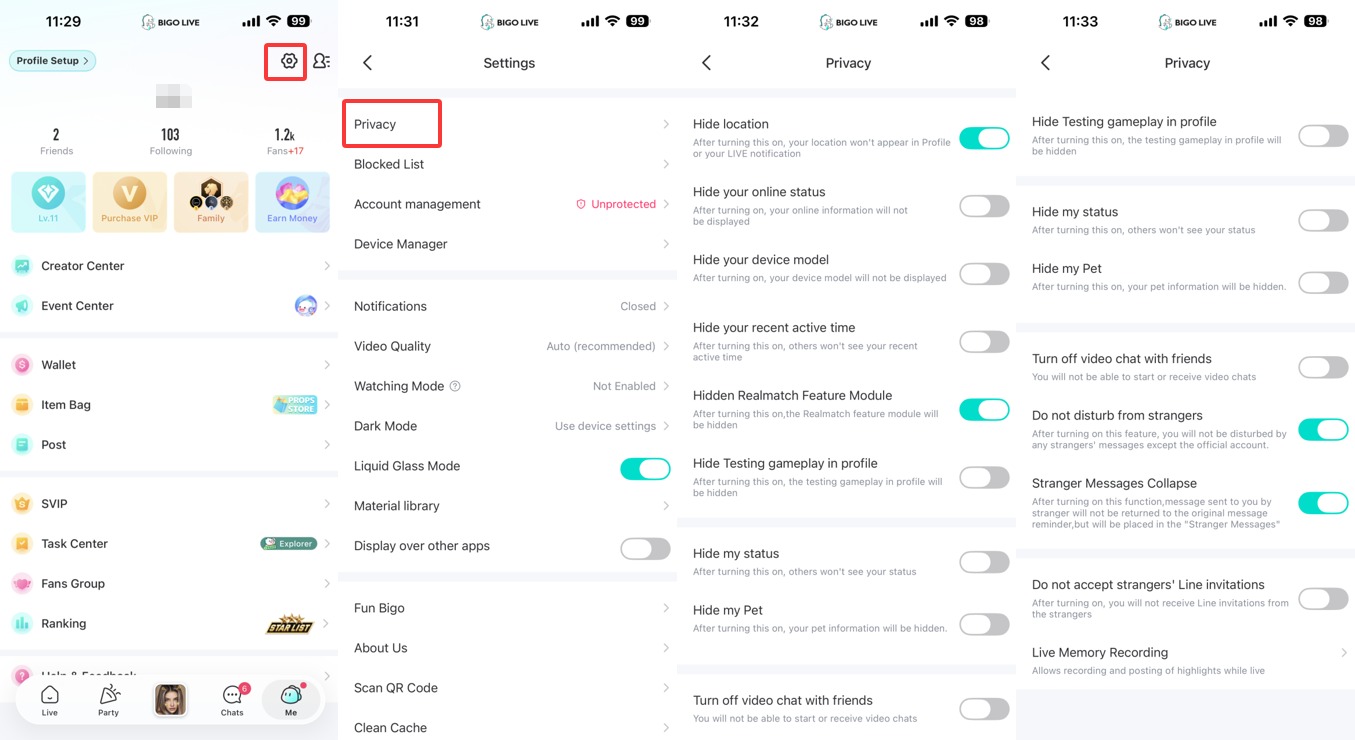
- Access "Settings": Tap the gear icon located on your "Me" page.
- Open "Privacy": This is the very first option at the top of the menu list.
- Toggle "Hide location": Switch this to ON. This ensures your city and district don't pop up on your profile or during your live shows.
- Enable "Do not disturb from strangers": This is the ultimate move—it stops any message that isn't from a verified friend or an official account.
- Switch on "Stranger Messages Collapse": Keep your inbox clean and hide any filtered trash from view.
- Turn on "Hide your online status": Use this if you want to lurk in rooms without people knowing you’re active. For more tips on navigating the app, check out our guide on how to use BIGO LIVE.
- Check your "Blocked List": Return to the main Settings menu to verify that past troublemakers are still on the "no-entry" list.
Advanced Techniques for Total Safety
- The "Report" Button is Your Friend: If someone is being gross in a chat, tap their name to see the pop-up and hit "Report." This alerts our team to scan their recent activity. Maintaining safety on BIGO LIVE is our top priority.
- Limit Device Info: Toggle "Hide your device model" in the Privacy menu. Scammers often use your phone type to figure out your location or income level.
- Silence the Invitations: Make sure "Do not accept strangers' Line invitations" is turned on. This prevents bot accounts from dragging you into weird group chats.
- Pick Stream Admins: When you're live, give a couple of your regulars the power to "Kick out and Block" anyone who starts acting up. If you're looking to become popular on BIGO LIVE, having a trusted team is essential.

Ready to Stream Safely?
Join 600 million users today and start your broadcasting journey with peace of mind.
Download BIGO LIVE NowFrequently Asked Questions (FAQ)
Q: If I block someone, can they find me on a new account?
A: Only if they know your ID or UID. If you’ve hidden your following info and location, it's much harder for them to track you down.
Q: Will hiding my location stop me from seeing people nearby?
A: Yes, it’s a trade-off. You won't show up on their "Nearby" map, and they won't show up on yours.
Q: Can friends still see when I'm online?
A: Not if you flip the "Hide your online status" switch. You’ll look offline to everyone, even your besties.
