


Want to go live without appearing on camera? Audio streaming on Bigo Live lets you connect with over 600 million users worldwide using just your voice. Whether you're hosting conversations, sharing stories, or building community, audio live gives you the freedom to broadcast your way in 2026.
Broadcasting audio-only content removes the pressure of video while keeping the real-time connection that makes live streaming special. Even better—Bigo Live includes built-in voice effects that let you transform how you sound instantly during your broadcast.
This guide walks you through launching your first audio stream and using the voice mixer to add creative effects that surprise and entertain your audience.
Getting Started with Audio Live
Setting up your audio stream takes less than a minute. The interface puts everything you need right at your fingertips, making it easy for anyone to start broadcasting.
Step 1: Launch the Broadcast Menu
Open your Bigo Live app and locate the circular button at the bottom center of your screen—it displays a plus sign or camera icon. Tap this button to access your broadcast options.
Step 2: Select Audio Live Mode
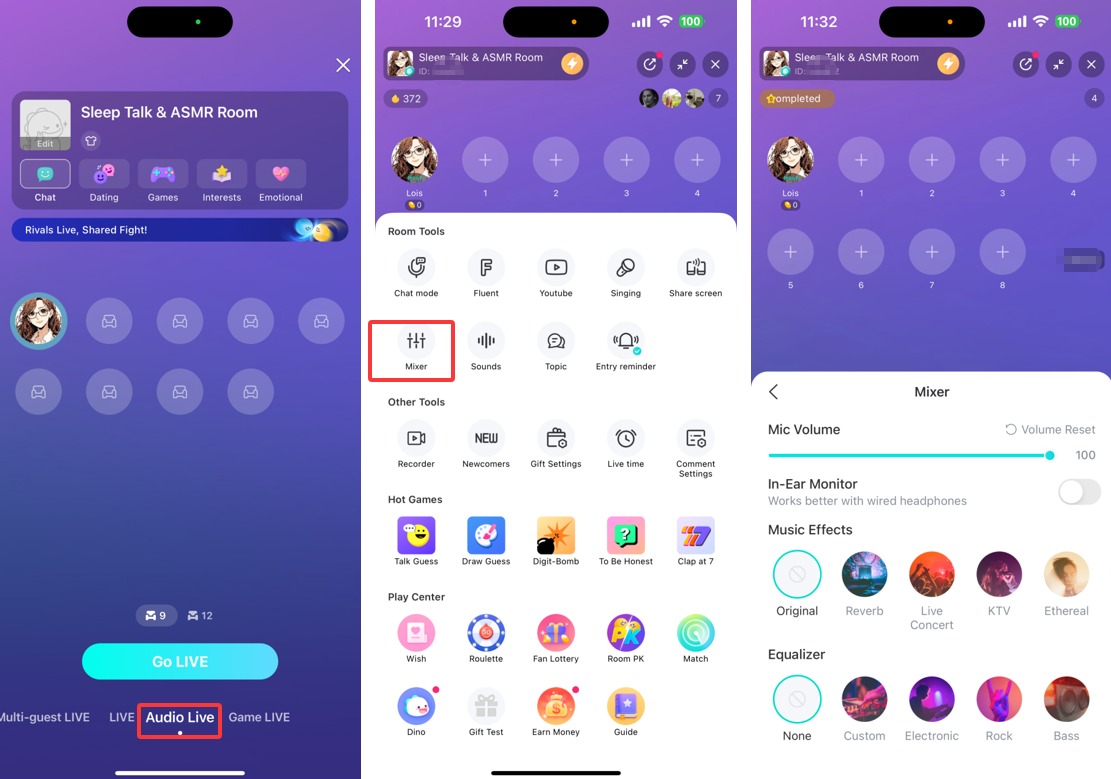
Several streaming formats appear after tapping the broadcast button. Swipe horizontally or tap directly on "Audio Live" to activate voice-only mode. This format focuses entirely on your audio without requiring video.
Step 3: Configure and Start Broadcasting
Create a compelling title that tells viewers what to expect from your stream. Add an eye-catching cover image to stand out in the browse feed—this visual element remains important even for audio content. When everything looks ready, tap "Go Live" to begin your broadcast.
Pre-Stream Checklist
Transforming Your Voice with Effects
Once your audio stream goes live, you can access powerful voice modification tools without interrupting your broadcast. These effects add entertainment value and help create unique content that stands out.
Access the Tools Menu
While broadcasting, look at the bottom section of your screen for the menu icon showing three horizontal lines (☰). Tap this icon to reveal your streaming tools panel.
Open the Mixer Controls
The tools panel displays multiple options for managing your stream. Locate and tap "Mixer" to access your audio control center. This section handles everything from background music integration to voice transformation.
Apply Voice Effects
Inside the Mixer, you'll find "Effects" and "Equalizer" tabs containing dozens of voice modifications. Experiment freely—tap any effect to hear how it transforms your voice in real time. Popular options include robot voice, deep bass enhancement, echo effects, and character voices. Switch between effects as often as you like during your stream.
Audio Streaming Best Practices for 2026
Successful audio streamers on Bigo Live follow specific strategies that boost engagement and build loyal audiences. These proven techniques help you make the most of voice-only broadcasting.
- Maintain consistent streaming schedules so your audience knows when to find you live
- Interact actively with chat messages by reading and responding to viewer comments
- Use strategic pauses to let your voice rest and create natural conversation rhythm
- Vary your vocal tone and energy to keep listeners engaged throughout your broadcast
- Test voice effects beforehand to understand which ones work best for your content style
- Promote your streams on social media using cross-platform strategies
Audio Live works particularly well for talk shows, music discussions, podcast-style content, Q&A sessions, and storytelling. Many creators combine it with Multi-Guest features to host panel conversations with multiple participants.
Why Audio Streaming Matters
Voice-only broadcasting opens doors for creators who prefer staying off-camera or want to focus purely on content quality. You can stream while multitasking, maintain privacy, and reduce setup complexity compared to video production.
The format also allows listeners to tune in while commuting, working, or doing other activities—expanding your potential audience beyond those who can actively watch screens. This flexibility makes audio streaming increasingly popular across leading streaming platforms in 2026.
Ready to Start Your Audio Journey?
Join millions of creators sharing their voice on Bigo Live. Download the app and go live in minutes—no fancy equipment needed.
 Download Bigo Live
 Share Your Audio Streaming Experience
Found this guide helpful? Share it with fellow creators:
Audio Live streaming removes barriers between you and your audience, creating intimate connections through voice alone. With Bigo Live's intuitive interface and creative voice effects, you have everything needed to launch engaging broadcasts that keep listeners coming back. Start experimenting with different effects, find your unique sound, and build your community one stream at a time.
