


Stop looking like a pixelated mess and start looking like a pro. This tutorial shows you how to hit that crisp 1080p quality that makes viewers stay. You just need a stable internet connection and the "Video Quality" menu to get started.
Core Optimization Checklist
- ✔ Set Resolution: Lock your quality to Full HD manually.
- ✔ Bandwidth: Ensure at least 10 Mbps upload speed.
- ✔ Hardware: Clean lenses and proper lighting are non-negotiable.
Steps for High Live Stream Video Quality
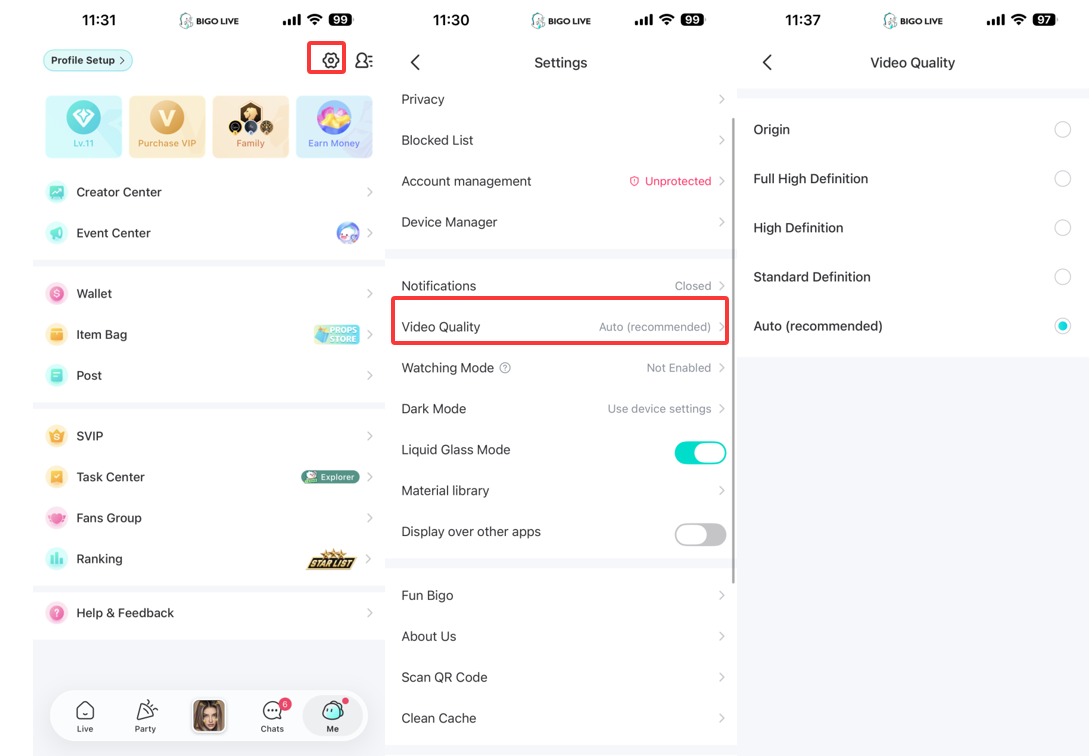
- Navigate to the "Me" tab and tap the gear icon for "Settings."
- Click on "Video Quality," which is usually the fifth option down the list.
- Deselect "Auto (recommended)" immediately—this is what causes the quality to dip as soon as your Wi-Fi wobbles.
- Pick "Full High Definition" if you have a top-tier phone and killer internet.
- Select "High Definition" as a safe middle ground if you're on mobile data or a standard Wi-Fi plan.
- Clean your camera lens with a microfiber cloth; a single smudge can make the best 1080p feed look like a blurry nightmare.
- Add a light source in front of your face. Dark rooms force the camera to use "ISO gain," which creates that grainy, snowy look. For more visual tips, see our guide on filters and effects.
Quick Poll: What's your biggest quality hurdle?
Advanced Techniques for Pro Quality
- Origin Mode: If you see the "Origin" option in your menu, only use it if you are on a high-speed fiber connection. It sends the rawest data possible for the sharpest picture.
- Liquid Glass Mode: Make sure this toggle is ON in your main Settings if you use iOS devices. This works great alongside other exclusive BIGO app features.
- Wired Connections: If you're using a laptop, plug in an Ethernet cable. Wi-Fi "drops packets" which is the #1 reason for those sudden pixelated freezes. You can learn more about broadcasting via BIGO LIVE for PC here.
- Check Upload Speed: Use a speed test site. You need at least 10 Mbps of upload speed (not download!) to maintain a steady 1080p broadcast.

Ready to Shine in 1080p?
Join over 600 million users and show the world your best side.
Download BIGO LIVE NowFAQ
Why does my stream look bad on 5G?
Cellular data is notorious for "jitter." Even if it's fast, the signal strength changes every few seconds, which trips up the app’s encoder.
Do my viewers see 1080p if I set it that way?
Only if their internet can handle it. If they are on a weak signal, the app will downscale the video on their end to keep the audio synced.
Does the "Beauty Filter" make it blurry?
Yes, high-level filters add a "soft focus" effect. If you want maximum sharpness, dial the filters down to 20% or less.
