


Need help with your BIGO LIVE account, recharge, live stream, or app experience? We’re here to help.
For most questions, the best place to start is Help & Feedback in the BIGO LIVE app. If you cannot access the app or your account, email our customer service team at feedback@bigo.tv.
This guide will help you choose the right support channel and provide the information we need to assist you.
Choose the Right Support Channel
| What do you need help with? | Where to start |
|---|---|
| Account settings, app features, wallet, or a technical issue | Me > Help & Feedback > Feedback in the BIGO LIVE app |
| A hacked account, lost login access, or an unavailable linked phone number | Account Appeal on the login screen |
| Diamonds missing after a successful recharge | In-app support with your transaction details |
| An inappropriate live stream, profile, or message | The in-app Report button |
| You cannot open the app or access in-app support | feedback@bigo.tv |
| Support for a specific country or region | See our regional contacts below |
| Agency, business, gaming, press, or career inquiries | See the relevant contact section below |
Contact Us Through the BIGO LIVE App
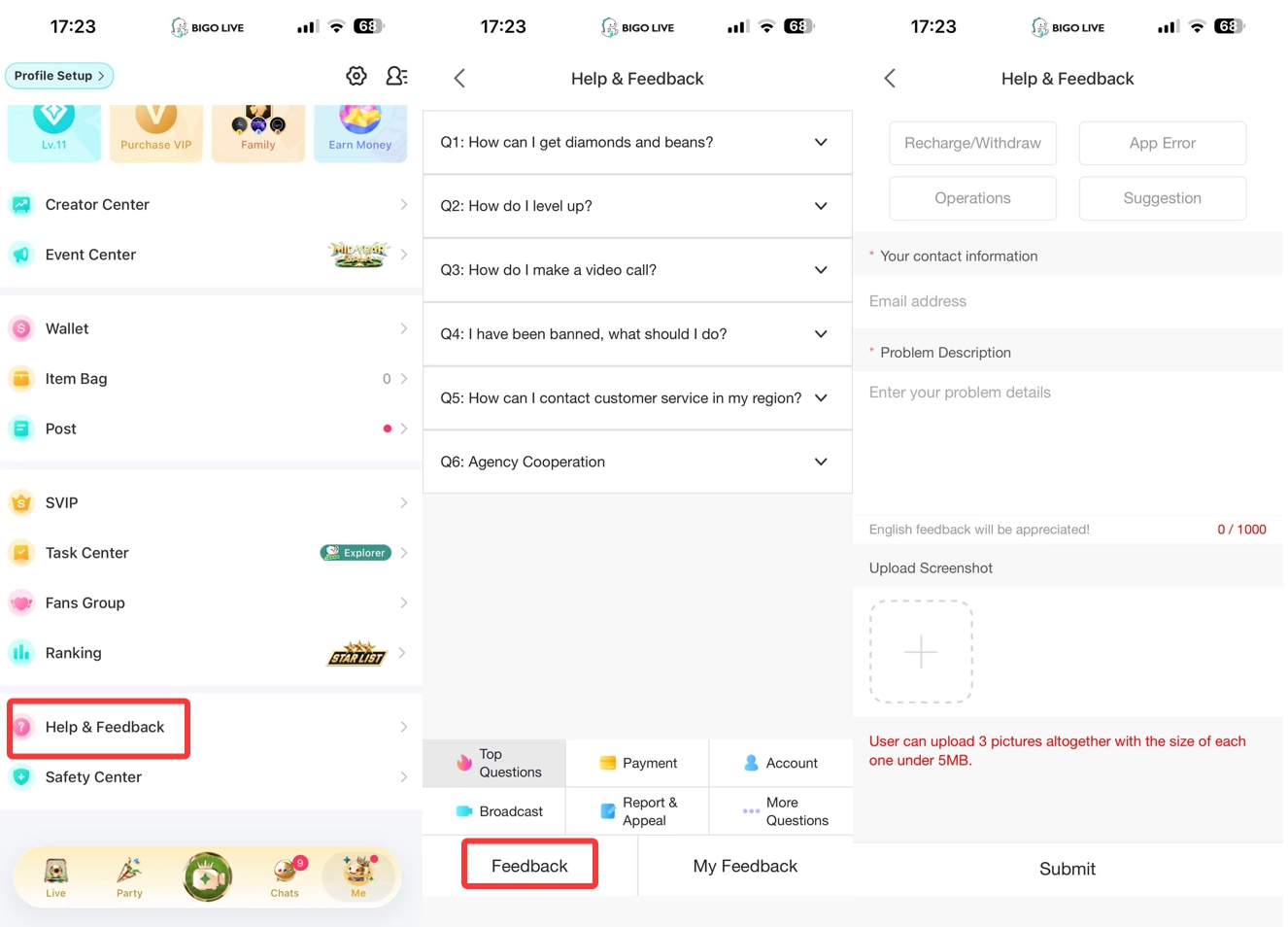
If you can sign in, contacting us through the app is the easiest way to get help with your account. Follow these steps:
- Open BIGO LIVE and tap Me in the bottom-right corner. Scroll down and select Help & Feedback.
- Browse the available answers under Top Questions, Payment, Account, Broadcast, Report & Appeal, or More Questions. If you still need help, tap Feedback at the bottom of the screen.
- Select the feedback type that best matches your issue: Recharge/Withdraw, App Error, Operations, or Suggestion.
- Enter your email address under Your contact information. Describe the issue in the Problem Description field. Please write in English where possible and keep the description within 1,000 characters.
- Upload up to three screenshots if they will help explain the problem. Each image must be smaller than 5 MB. Then tap Submit.
After submitting your request, return to Help & Feedback and tap My Feedback to view your submitted feedback.
You can use Help & Feedback for:
- Account and login questions
- Recharge, Diamonds, Beans, gifts, and wallet issues
- Streaming, camera, microphone, sound, or connection problems
- App errors, notifications, and performance issues
- Account restrictions and appeals
- Creator and broadcaster features
If you receive a case number or appeal number, keep it for future reference. Check My Feedback before submitting another request about the same issue.
Email BIGO LIVE Customer Service
If you cannot use in-app support, contact us at feedback@bigo.tv. This is our official global customer service email.
Please include the following information so we can understand and review your issue:
- Your BIGO ID
- Your country or region
- A short and clear description of the problem
- The date and time the issue occurred, including your time zone
- Your phone model and operating system
- Your BIGO LIVE app version, if available
- Screenshots or a screen recording of the issue
- Any relevant transaction, appeal, or case number
- The steps you have already tried
Please do not include your password, verification code, full payment-card number, or any information that is not necessary for us to investigate the issue.
Recover a Hacked Account or Restore Login Access
If you cannot sign in because your account may have been stolen or you no longer have access to the linked phone number, use Account Appeal from the BIGO LIVE login screen.
- Open the BIGO LIVE login screen.
- Tap Account Appeal beside Forgot Password.
- Select the reason that matches your situation.
- Complete the appeal form and upload the requested supporting information.
- Return to Account Appeal > My Appeal to check the status.
Our customer service team reviews Account Appeals within three working days. You can learn more about the required information in our hacked account recovery guide.
If your appeal does not resolve the issue, go to Me > Help & Feedback > Feedback and contact us with your appeal submission number.
If you believe someone has accessed your account, secure every login method connected to it. Change any compromised passwords and review the security of your phone number, email, Apple ID, Google account, Facebook account, or other linked service.
Get Help with Recharge, Diamonds, Beans, or Payments
Most successful recharges are credited promptly. If your payment was successful but the Diamonds have not appeared after 30 minutes, contact us through Help & Feedback in the app.
Please prepare:
- The BIGO ID that should have received the Diamonds
- The purchase amount and currency
- The date, time, and time zone of the transaction
- The payment or recharge channel used
- The order or transaction ID
- A copy of the receipt or payment confirmation
- A screenshot of your balance or any error message
Before submitting your request, confirm that the recharge was made to the correct BIGO ID. Do not repeat the payment while the original transaction is still being reviewed.
Always use an official BIGO LIVE recharge channel. We will never ask you to send money to an individual to release Diamonds, Beans, or a withdrawal. For more information, read our official BIGO LIVE recharge guide.
Report Inappropriate Content or Behavior
If you see content or behavior that may violate our Community Guidelines, report it directly in the app. In-app reports send the relevant account or content information to our moderation team for review.
Report a Live Broadcast
Open the live room tools, select Report, choose the reason that best describes the issue, and submit the report.
Report a Private Message
Open the conversation menu and select Report. You can also block the account to prevent further contact.
Report a User Profile
Open the user’s profile menu, select Report, choose the appropriate category, and submit.
If the case involves several incidents or you need to provide additional evidence, email feedback@bigo.tv. Include the reported user’s BIGO ID, the date and time of each incident, a factual description, and relevant screenshots or recordings.
Our BIGO LIVE reporting guide provides detailed instructions for each type of report.
If someone is in immediate danger or you believe a crime is taking place, contact your local emergency services or law-enforcement authority. Authorized officials may submit requests through our Law Enforcement Request Portal.
Try These Steps Before Requesting Technical Support
If BIGO LIVE is not working as expected, try these basic checks first:
- Update BIGO LIVE through the official app store.
- Close and reopen the app, then restart your phone.
- Switch between Wi-Fi and mobile data to test your connection.
- Make sure BIGO LIVE has permission to use your camera and microphone.
- Check your available storage and clear the app cache if necessary.
- Note the exact error message and when it appears.
If you plan to reinstall BIGO LIVE, first confirm which phone number or third-party account is linked to your BIGO LIVE account and make sure you can still access that login method.
If the issue continues, contact us with your device model, operating system, app version, network type, and a screenshot or screen recording of the problem.
Regional BIGO LIVE Customer Service Contacts
You can contact feedback@bigo.tv from any region. The following markets also have dedicated customer service channels:
| Region | Customer service channel |
|---|---|
| Middle East and North Africa | BIGO ID: @MenaCS |
| USA and Canada | cs_bigoamerica@bigo.sg |
| Portuguese-speaking regions | contato@bigo.tv |
| Spanish-speaking regions | bigolivees@bigo.sg |
| United Kingdom | feedback@bigo.tv |
| Vietnam | feedback_vietnam@bigo.tv |
| Indonesia | LINE: @csbigoliveindonesia |
| Thailand | feedback_th@bigo.tv |
| Malaysia, Brunei, and Singapore | BIGO ID: 80089 |
| Philippines | bigoph@bigo.tv |
| Cambodia | Facebook: @CambodiaBigoLive |
| Chinese regions | feedback@bigo.tv |
| Japan | LINE: @piq7164f |
| Korea | BIGO ID: 80042 |
| India | bigo-india@bigo.sg |
| Pakistan | customerservice_pk@bigo.sg |
| Bangladesh | feedback@bigo.tv |
| Russia | feedback@bigo.tv |
| Turkey | BIGO ID: 80009 |
| All other regions | feedback@bigo.tv |
These channels are for user support. Agency and business inquiries should be sent to the appropriate team below.
Business, Press, Gaming, Agency, and Career Inquiries
To help your inquiry reach the right team, please use the contact that matches your purpose:
- Global business cooperation: hibd@bigo.sg
- Gaming cooperation: bigogaming@bigo.sg
- Press inquiries: press@bigo.sg
- Agency cooperation: visit our Agency Cooperation page for regional contacts
- Host or agency applications: use the official application form
- Career opportunities: visit BIGO Technology Careers
Please note that our Agency Cooperation page is intended for agency partnerships. It is not a customer service or corporate recruitment page.
Corporate Headquarters
For official correspondence or visits to our corporate headquarters, here is our address:
Mapletree Business City
30 Pasir Panjang Road
#15-31A
Singapore
117440
Telephone: +65 63519330
Protect Yourself From Fake Support Accounts
Only use support channels published on an official BIGO LIVE or BIGO Technology website.
Please remember:
- We will never ask for your BIGO LIVE password or one-time verification code.
- We will never ask you to pay an individual to recover an account or remove a restriction.
- Do not provide your full payment-card number by email or chat.
- Do not install remote-access software at the request of an unknown person.
- Do not trust an account simply because its name or profile picture includes the BIGO LIVE logo.
- Keep your receipts, screenshots, appeal numbers, and support case information until the issue is resolved.
If you receive a suspicious message from someone claiming to represent BIGO LIVE, do not share any information. Report the account through the app.
Frequently Asked Questions
What is the official BIGO LIVE customer service email?
Our global customer service email is feedback@bigo.tv. Some countries and regions also have dedicated support channels listed above.
How do I contact BIGO LIVE Support in the app?
Open BIGO LIVE and tap Me > Help & Feedback. Review the answers in the relevant category first. If you still need assistance, tap Feedback, select an issue type, enter your email address and problem description, add up to three screenshots if needed, and tap Submit. You can review your request under My Feedback.
How can I contact support if I cannot log in?
Use Account Appeal on the login screen if your account was stolen or you lost access to your linked phone number. For other issues, email feedback@bigo.tv and include your BIGO ID, country or region, device information, and supporting evidence.
How long does BIGO LIVE Support take to respond?
Response times vary according to the issue and the information required. Account Appeals for hacked or stolen accounts are reviewed within three working days. You can check the status under Account Appeal > My Appeal.
What should I do if my Diamonds have not arrived?
If a successful recharge has not been credited after 30 minutes, contact us through Help & Feedback. Include your BIGO ID, order number, receipt, purchase amount, transaction time, and a screenshot of your current balance.
Can I appeal an account restriction or ban?
Yes. Use the appeal option shown in the app or contact us through Help & Feedback. Include a screenshot of the notice and explain why you believe the decision should be reviewed.
An appeal will be reviewed under our policies, but submitting one does not guarantee that the restriction will be removed.
Where can I apply to become a BIGO LIVE host or agency?
Use our official host and agency application form. Existing or prospective agency partners can also find regional contacts on the Agency Cooperation page.
We’re Here to Help
Choosing the right support channel and providing complete information can help us review your request more efficiently. Start with Help & Feedback in the BIGO LIVE app whenever possible. If you cannot access the app, email us at feedback@bigo.tv.
Need to access the latest in-app support options?
Download or update the official BIGO LIVE app.