


Finding that your BIGO LIVE account has been stolen can be stressful — especially if you've built up followers, beans, or broadcast history. The good news is that BIGO LIVE provides a dedicated Account Appeal process to help you recover access quickly. Here's a step-by-step guide on exactly what to do.

Download BIGO LIVE on the device you actively use, then follow the steps below.
How to Know Your Account May Be Hacked?
Watch out for these warning signs:
You can no longer log in with your usual phone number or password
Your profile photo, username, or bio has been changed without your action
Your linked phone number has been replaced by someone else
Unusual broadcasts or messages have been sent from your account
How to Start an Appeal?
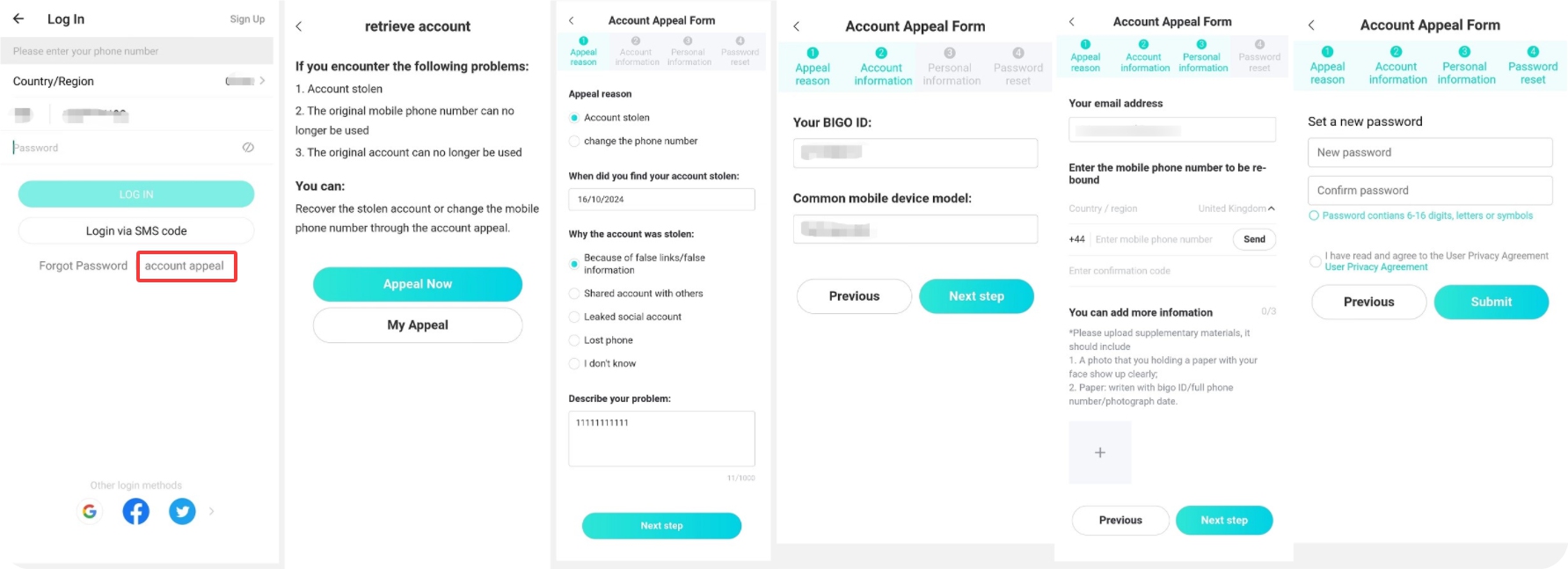
If you cannot log in, open the BIGO LIVE login page and tap Account Appeal at the bottom of the login screen — right next to "Forgot Password". On the appeal page, users can choose to recover a stolen account or change the bound phone number, and the system also provides a separate My Appeal entry for checking progress.
For related guidance, you can also read the BIGO LIVE Blog guides on BIGO LIVE login, changing your BIGO phone number, and BIGO LIVE support.
What Information You Need to Provide?
In the appeal form, BIGO LIVE asks you to select the appeal reason, describe the issue, and provide supporting account details. For hacked-account cases, the form may ask when you discovered the theft, the possible reason it happened, your usual mobile device model, and a description of the problem.
In the personal information step, you need to submit your email address and upload supporting materials. The required photo should include your face and a white paper with your BIGO ID, full phone number, and photo date clearly written on it. You can upload up to 3 photos. Make sure the handwriting is legible and your face is unobstructed.
- Select the appeal reason and describe the issue clearly.
- Prepare your discovery date, possible reason, usual mobile device model, and problem description.
- Submit your email address and upload supporting materials.
- Use a clear photo showing your face and a white paper with your BIGO ID, full phone number, and photo date.
What Happens After Submission?
BIGO LIVE's customer service team will review your appeal within 3 working days. You can check the status anytime by:
- Going back to the login page
- Tapping "Account Appeal" → "My Appeal"
How to Recover Losses from a Stolen Account
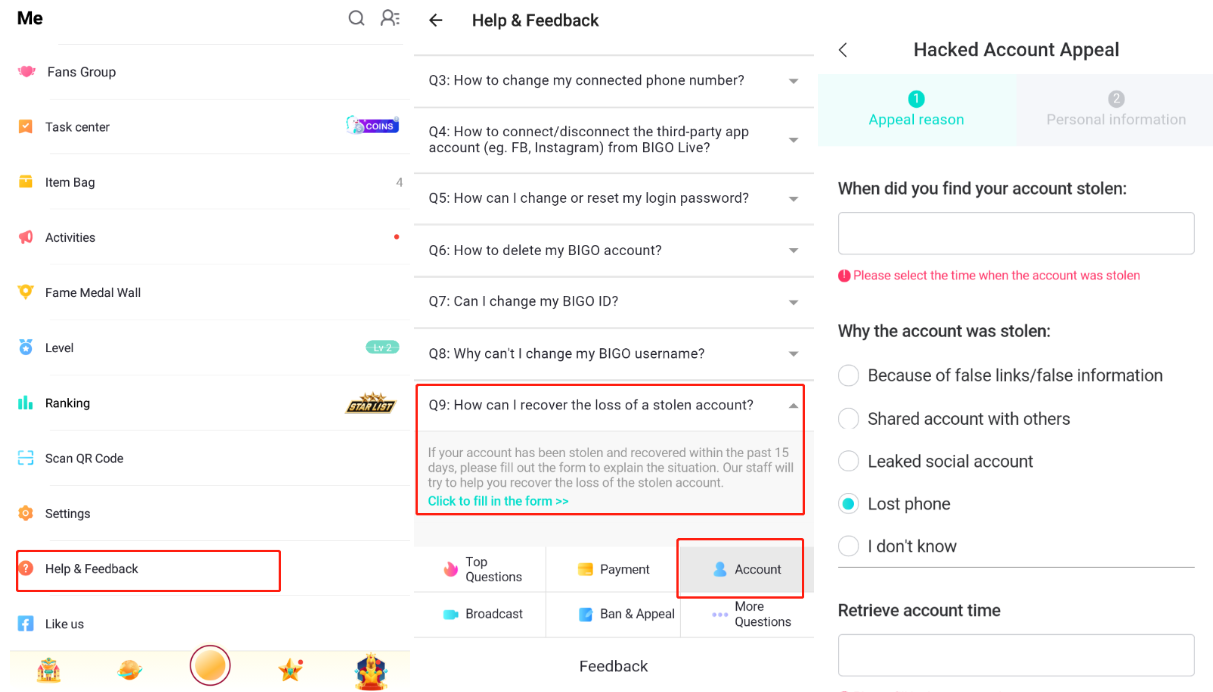
If your account was recovered and you believe items (beans, gifts, etc.) were lost during the hacking period, BIGO offers an additional loss recovery form.
Where to find it: Navigate to Help & Feedback → Account → Q9: How can I recover the loss of a stolen account? and tap the link to fill in the form.
How to Keep Your Account Safer?
- Never click suspicious links sent via messages on BIGO LIVE
- Always connect your account to a phone number you actively use
- Never share your login credentials or account with others
- If you notice anything unusual, change your password immediately
- Never buy or sell BIGO accounts — this violates the Terms of Service and puts your account at risk
To strengthen your everyday protection, review BIGO LIVE privacy settings, learn how to block unwanted messages, and check tips on preventing harassment on BIGO LIVE.
Need More Help?
If the appeal process doesn't resolve your issue, go to Help & Feedback → Feedback to contact the support team directly. Keep your appeal submission number handy for reference.
FAQ
How long does BIGO LIVE take to review an Account Appeal?
BIGO LIVE's customer service team will review your appeal within 3 working days.
Where can I check my appeal status?
You can go back to the login page, tap "Account Appeal", and then tap "My Appeal" to check the status.
What should be included in the supporting photo?
The required photo should include your face and a white paper with your BIGO ID, full phone number, and photo date clearly written on it. Make sure the handwriting is legible and your face is unobstructed.
Can I recover beans, gifts, or other items lost during the hacking period?
If your account was recovered and you believe items were lost, go to Help & Feedback → Account → Q9: How can I recover the loss of a stolen account? and tap the link to fill in the form.
What should I do if the appeal process does not resolve my issue?
Go to Help & Feedback → Feedback to contact the support team directly, and keep your appeal submission number handy for reference.
