


You find a “free” MLB stream, hit play, and get asked to pay for a subscription. The next site is missing your game. Another loads an ad, then leaves you waiting for the picture to catch up.
Replays can be just as frustrating. You drag the playhead back to a full-count pitch with the bases loaded, only to get another spinning wheel. By then, you want a player that works and a straight answer about the bill.
Here is how I would choose among five U.S. services to stream the World Series 2026, based on the picture, replay tools, channel lineup, and monthly cost.

Five services, side by side
For the World Series, look for FOX. For a season-long subscription, the rest of the lineup matters too.
| Platform | Payment required? | Access check | Consider it when… |
|---|---|---|---|
| FOX One | Yes · $19.99/mo. | Standalone subscription | You mainly want this series |
| YouTube TV | Yes · $82.99/mo. base plan | Local FOX availability | You want a broader TV lineup |
| Hulu + Live TV | Yes · $99.99/mo. with ads | Live TV plan + local FOX | Your household also uses Hulu |
| Fubo | Yes · plan/ZIP dependent | Confirm local FOX in your plan | You are comparing sports bundles |
| Sling TV | Yes · Orange/Blue from $45.99/mo. | FOX in selected markets/plans | Your ZIP code passes the channel check |
Monthly prices in USD, checked October 29, 2026. Taxes, regional fees, and add-ons are extra where applicable.
What watching on each service was like
FOX One: my pick for picture quality and smooth playback
Does it cost money? Yes. The standalone plan costs $19.99 per month, with a three-day free trial currently advertised.
FOX One stayed sharp during my evening viewing, without the frame drops that make a fast play hard to follow. I could pick out the grass in wide shots and track a runner rounding third.
Select broadcasts are available in up to 4K HDR. I also liked Multiview, which lets me follow up to four live streams on one screen when events overlap.
The commentary was clear without drowning out the ballpark. I could hear the bat make contact and the crowd react, with no noticeable compression distortion.
When I missed the live action, full-game replays were available within two hours of the final out. Playback-speed controls and chapter navigation made it easy to catch up or jump back to the pitch I wanted to see again.
Which MLB games does it cover? FOX One brings FOX’s sports coverage, including FS1 and FS2, into one service. Its baseball lineup includes selected regular-season games, FOX’s postseason coverage, and the World Series. It is not MLB.TV and does not carry every regular-season game. For following teams throughout the season, MLB.TV is another option, with national-broadcast and blackout restrictions.
YouTube TV: the DVR is the reason I would keep it
Does it cost money? Yes. The main plan costs $82.99 per month, plus applicable tax. Optional add-ons cost extra.
YouTube TV made it easy to record games and watch on my own schedule. The picture held up, too. At $82.99 a month, though, I would want to use more than its baseball coverage.
What I can watch
For nationally televised baseball, I look to ESPN, FOX, FS1, TBS, and NBC in the lineup. That gives me a useful mix of selected regular-season games and postseason broadcasts, including the World Series on FOX. Local FOX and NBC access depends on my TV market.
Picture quality and everyday viewing
The 1080p broadcasts I watched looked clear, with few noticeable frame drops. Select 4K programming requires the separate 4K Plus add-on.
I could switch between my phone, tablet, computer, and TV, including Apple TV and Chromecast.
The feature I use most: unlimited cloud DVR
Cloud DVR is a big reason I would keep YouTube TV beyond the World Series. I can add games to my library without juggling a storage limit, then watch when I have time. Pausing, rewinding, and fast-forwarding a recording make it easier to revisit a key inning without staying glued to the live broadcast.
My biggest frustration: spoilers arriving first
The delay matters more to me than a small difference in picture quality. When a stream is 30–60 seconds behind, a score alert or a friend’s message can spoil the home run before I see the swing. That takes some of the fun out of following a game together, especially if everyone is watching through a different service.
For game-night chats, I mute score alerts and avoid the group thread until the play catches up. YouTube TV also has a Broadcast Delay setting on supported TVs: “Decrease” brings the feed closer to live, while “Default” gives playback more buffer.
Hulu + Live TV: my pick for baseball and binge-watching
Does it cost money? Yes. The with-ads Live TV plan costs $99.99 per month and includes the Hulu on-demand library.
I would not switch from YouTube TV to Hulu for baseball alone. The picture and delay felt similar. Hulu made more sense when I factored in the shows and movies I watch between games.
The baseball coverage I look for
ESPN, FOX, FS1, and TBS cover a mix of nationally televised regular-season and postseason games. FOX handles the World Series.
Picture quality: on par with YouTube TV
The 1080p broadcasts looked about as good as YouTube TV’s on my setup. I could also move from the TV to my phone or computer without much fuss.
The same frustration with live delay
I still had to watch out for spoilers. Hulu did not give me a noticeable timing advantage over YouTube TV when following the group chat.
Where Hulu wins me over: the on-demand library
After the final out, I can move straight into a series, a reality show, or a movie in Hulu’s on-demand library. That is the biggest difference for me compared with YouTube TV: I am getting live sports and a library I actually want to use between games.
Fubo: for the household that always has a game on
Does it cost money? Yes. Pricing depends on the plan, local channel lineup, regional sports fees, and add-ons. I compare the complete monthly total rather than the introductory offer.
Fubo makes more sense to me when baseball shares the schedule with football, basketball, and other sports. Regional networks and Multiview are the draw. Add-ons and fees are where the bill starts to climb.
Channel depth is the draw
FOX, FS1, and ESPN are among the channels I look for, with MLB Network available in eligible packages or add-ons. Regional sports networks are another reason I consider Fubo when following a local team. The useful question is whether my team’s network is available at my address, rather than how many regional networks Fubo carries nationwide.
I can also add MLB.TV for live out-of-market games that are not nationally televised. That extends the regular-season options, but does not turn the package into unrestricted access to every game.
The gap I pay attention to is Turner coverage: Fubo lacks TNT and TBS. That matters for baseball games carried by TBS, so I would not choose Fubo on the assumption that its sports focus means it includes every postseason broadcaster.
4K HDR and Multiview
Select broadcasts are available in 4K HDR with an eligible plan and compatible device.
Multiview lets me put several live channels on one screen on supported devices, including Apple TV. For overlapping games, I find that more useful than constantly changing channels. It is a way to follow separate broadcasts together, rather than four camera angles from the same baseball game.
Unlimited DVR makes a busy sports week easier
Unlimited cloud DVR saves me from clearing recordings to make room for another game. That helps when several sports are on the same night.
The price takes more comparison
I would not choose Fubo just to get the lowest bill. Plan tiers, regional sports fees, and extras such as MLB.TV can change the value considerably. I work backward from the channels and features I want, then compare that total with YouTube TV and Hulu + Live TV.
Sling TV: my budget pick when I only need a few channels
Does it cost money? Yes. Sling Orange costs $45.99 per month, Blue starts at $45.99, and Orange & Blue starts at $60.99. Local-channel charges and extras can add to the total.
I would use Sling to keep the TV bill down. It costs less than YouTube TV or Hulu + Live TV, but choosing Orange or Blue takes a little homework.
Orange or Blue? I choose by the broadcaster
Orange includes ESPN, while Blue includes FS1 and local FOX in selected markets. Orange & Blue brings those lineups together. For the World Series, my priority is local FOX access; buying Orange for ESPN alone does not solve that.
TBS is available in Sling’s Orange and Blue lineups, and MLB Network is available through Sports Extra. Apple TV’s Friday Night Baseball is a separate subscription. Once I start adding channels, I compare the total again to see whether Sling still saves me enough money.
Picture and delay: fine for everyday viewing
The 1080p broadcasts were clear enough to follow the action. I did not see enough of a difference from Hulu or YouTube TV to pay more just for the picture.
Sling did not fix the spoiler problem either. I still kept score alerts off while watching and chatting with friends.
DVR: enough for a few games, with an upgrade available
Orange and Blue include 50 hours of cloud DVR. That is enough room for a handful of games, but I have to manage recordings more carefully than I do with YouTube TV’s unlimited storage. Sling also offers unlimited DVR for an extra $5 per month.
The game is over. Still want to talk baseball?
Your team just walked it off, and nobody in the group chat is awake. Or you are still trying to make sense of that pitching change. Open a live room and give other fans something to weigh in on.
BIGO LIVE has a global community of 700 million+ users. Host a postgame chat or join a conversation to meet people who share your interests.
Multi-guest LIVE: bring the postgame debate on camera
Invite friends on camera with Multi-guest LIVE. Give everyone a turn to pick an MVP or defend the manager’s call. It works well for a postgame panel where you want to see each other’s reactions.
Audio Live: talk it through without turning on the camera
For a late-night recap without the camera, start an Audio Live room. Talk through the final inning, catch up with friends, or make your picks for the next game. No need to get camera-ready.
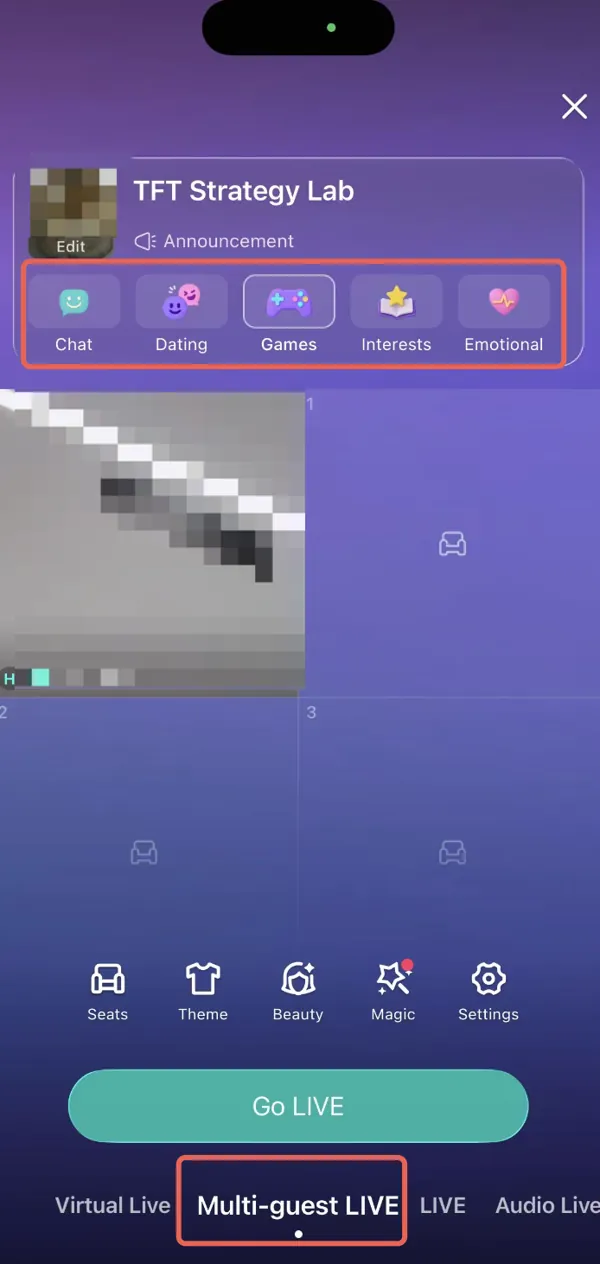
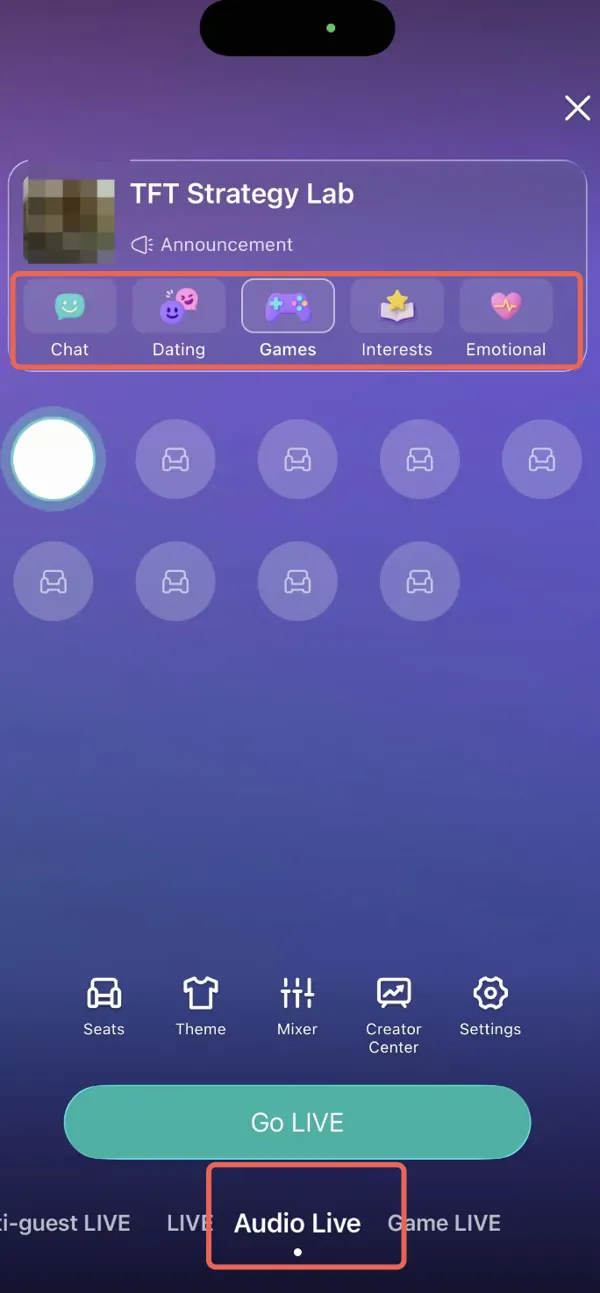
Give your room a clear topic, such as “World Series 2026: Who was your MVP?” or “Let’s talk about that ninth inning.” The room setup includes interest categories such as Chat, Games, and Interests, so you can frame the conversation around what you want to discuss.
If your friends are watching from different homes, watch party apps are another way to plan a shared viewing night. After the final out, bring the conversation to a BIGO LIVE room for your own postgame recap.
Ready to host your first postgame chat? Explore what is BIGO LIVE or follow the how to use BIGO LIVE guide, then choose the room format that fits your night.
Choose by what you actually watch
A smaller TV bill → Sling TV
Choose Sling if you want a smaller channel bundle and can live with some delay. For the World Series, Blue must include your local FOX station. FOX One costs less if FOX is all you need.
FOX baseball on a sharp big screen → FOX One
My choice for FOX’s baseball coverage when picture and audio matter most. At $19.99 a month, it also keeps the cost down for the World Series alone.
A full TV lineup and easy recording → YouTube TV
Choose YouTube TV if you record lots of games and want a broad TV lineup. Unlimited DVR means you can save games without managing storage.
Baseball plus series and movies → Hulu + Live TV
Choose Hulu if you will use its on-demand shows and movies between games. That library is the reason I would pay for it over a baseball-only option.
Several sports and regional coverage → Fubo
Choose Fubo if it carries your team’s regional network and you will use Multiview for overlapping games. Factor in the missing TBS coverage before committing.

Still talking about that ninth inning?
Start a room called “Who was your World Series MVP?” Bring friends on camera with Multi-guest LIVE, or choose Audio Live for a voice-only recap.
Find your next conversation on BIGO LIVE, with 700 million+ users worldwide.
World Series 2026 streaming FAQ
Where can I stream the World Series 2026 in the U.S.?
FOX One, or a live TV package that carries your local FOX station. For a bundle, enter your ZIP code to check the station lineup.
Can I watch without cable?
Yes. FOX One offers a standalone subscription. YouTube TV, Hulu + Live TV, Fubo, and eligible Sling packages are other internet-based options.
Is there a free World Series stream?
An eligible free trial may cover a game, but it will renew into a paid subscription unless you cancel. An antenna is another option for receiving local FOX with no monthly TV fee, provided you have reception; it is broadcast TV rather than an internet stream.
Does my regular Hulu subscription include the game?
You need Hulu + Live TV with local FOX access. The on-demand Hulu subscription alone does not include the live FOX broadcast.
Is MLB.TV alone enough for U.S. postseason viewing?
No. U.S. postseason access through MLB.TV also requires authentication with an eligible participating pay TV provider for the network carrying the game.
Can I stream the World Series on BIGO LIVE?
Watch the game through a broadcaster, then use BIGO LIVE for your own postgame chat. Multi-guest LIVE brings friends on camera; Audio Live lets you talk by voice.
How do I avoid spoilers when streaming?
Mute score alerts and agree on a group-chat pause until everyone has seen the play. On supported YouTube TV devices, the Broadcast Delay setting can also bring playback closer to live.
